This Excel workbook provides a chronological record of calls, SMS messages, emails, in-person conversations, and voicemails involving pet owners. Each entry can capture the client and pet, contact date, topic, communication notes, commitment, response status, responsible staff member, due date, completion date, and priority.
The XLSX combines a 100-row Communication Log with calculated days open, follow-up checks, configurable lists, and summary indicators. It supports human-managed follow-up: the formulas identify records that need review, but the workbook does not send messages or reminders automatically.
How this workbook can help
- Keeps pet owner communications, commitments, responses, and outcomes in one dated record.
- Assigns each follow-up to a named owner with a due date, completion date, and priority.
- Surfaces missing information, scheduled work, due-soon items, overdue items, and closed records through calculated checks.
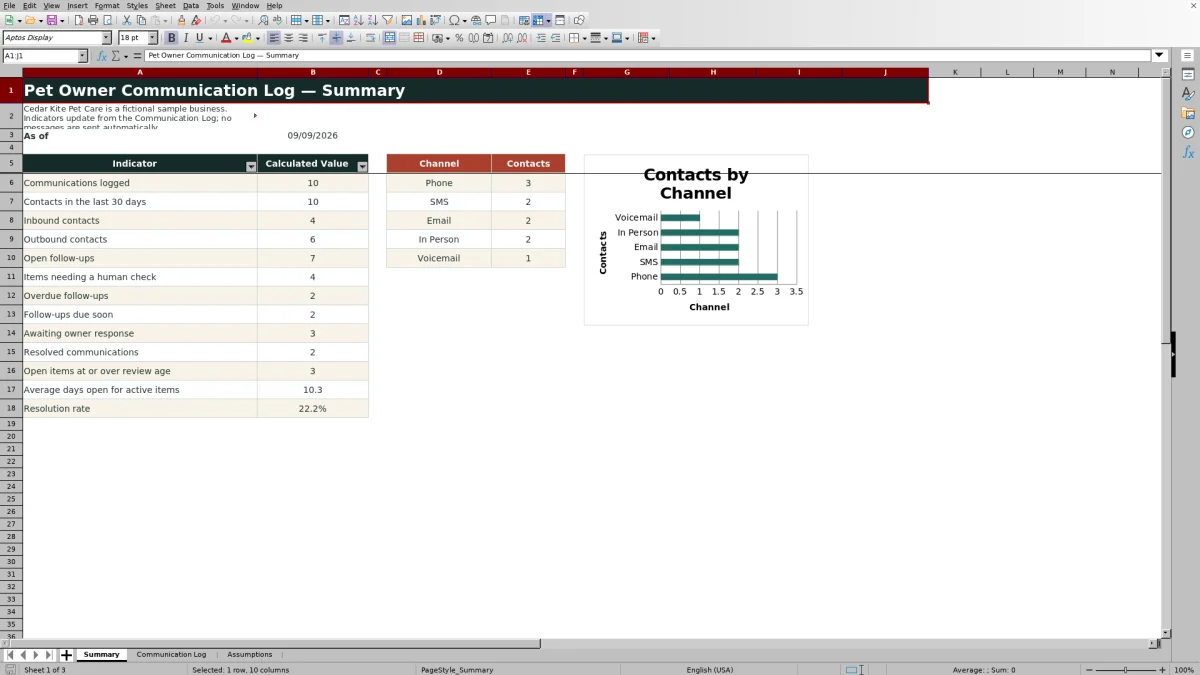
- Summarizes communication volume, channel usage, open-item aging, owner responses, and resolution activity.
What is in the file
How to get started
1. Configure the tracking choices
Open Assumptions and review the due-soon window, aging threshold, channels, directions, response statuses, priorities, and follow-up owners. Replace the fictional staff labels if needed, and avoid blank gaps between active list choices.
2. Record the communication
Enter one interaction per row in Communication Log. Add a unique Log ID, contact date, client and pet identifiers, channel, direction, topic, notes, and any commitment or next step.
3. Assign and update the follow-up
Select the response status, follow-up owner, due date, and priority. When work is finished, enter the completed date and update the status to Resolved or No Follow-Up.
4. Review calculated prompts and results
Check Days Open and Follow-Up Check for records requiring attention, then use Summary to review communication totals, overdue and due-soon work, aging, resolution rate, and channel counts.
Situation: Communication Becomes Difficult to Trace
Calls, texts, emails, and in-person conversations can create separate versions of what an owner requested and what staff promised. The workbook addresses that situation by placing the contact details, notes, commitment, response, deadline, and visible responsibility on the same row. It supports chronological review through the Contact Date field, although staff still need to enter and maintain the records.
Action: Capture the Contact and Commitment
For each interaction, record the Log ID, Contact Date, Client ID, Pet Name, Channel, Direction, Topic, Communication Notes, and Commitment / Next Step. Then select a Response Status, Follow-Up Owner, Follow-Up Due date, and Priority. The available channel choices are Phone, SMS, Email, In Person, and Voicemail; direction choices are Inbound and Outbound.
Result: Turn Entries Into Follow-Up Prompts
The Days Open formula measures elapsed days from the contact date to the completed date or the current date, with negative results prevented. Follow-Up Check then evaluates the record and displays Closed, Scheduled, Due soon, Overdue, Set contact date, Set status, Set due date, or Update status. The Summary rolls those records into counts for communications, recent contacts, direction, open work, overdue work, owner responses, aging, and resolution.
Interpretation: Read the Indicators in Context
An Overdue result means an active record has a follow-up date earlier than today; Due soon uses the editable window in Assumptions, initially set to three days. Open items at or above review age use the separate aging threshold, initially 14 days. The resolution rate compares Resolved records with records marked Resolved, Awaiting Owner, or Follow-Up Needed, so No Follow-Up entries are not part of that percentage.
Next Decision: An Interpreted Practical Example
Sample record COM-0002 shows an inbound SMS about an owner-supplied care note for Mochi on August 20, 2026. Staff committed to add the note to the visit checklist, assigned Sample Staff B, completed the action on August 21, and marked it Resolved. The result is a one-day resolution and a Closed follow-up check. The interpretation is that the commitment was completed rather than merely acknowledged, so the next decision is to leave the record closed and direct attention to active rows instead.
Errors and Solutions
If a populated row lacks a contact date, the check displays Set contact date; enter the actual date of the interaction. If Response Status is blank, select the appropriate status. If an active record has no deadline, add a Follow-Up Due date. If a completed date exists while the status remains active, update the status so the row can close. For an Overdue item, confirm that the commitment is still required, contact the owner or complete the task as appropriate, and then update the date and status rather than overwriting the original communication notes.
Comparison: Structured Log vs. Unstructured Notes
This comparison distinguishes the workbook's structured tracking from notes scattered across inboxes, documents, or informal lists.
| Criterion | Excel communication log | Unstructured notes or inbox history |
|---|---|---|
| Chronology | Uses a dedicated Contact Date and one row per logged interaction. | Dates may exist, but related contacts can remain split across locations. |
| Consistency | Uses validated choices for channel, direction, status, owner, and priority. | Terms and formats depend on individual habits. |
| Follow-up visibility | Calculates Days Open and a Follow-Up Check from entered dates and statuses. | Requires manual review and personal reminders. |
| Reporting | Provides calculated indicators and a channel chart on Summary. | Usually requires contacts to be gathered and counted separately. |
| Automation boundary | Identifies work for human review but sends no messages automatically. | An inbox may send messages, but unstructured notes do not provide the workbook's consistent checks. |
Choose the Excel log when a small team needs a shared, reviewable record with formula-based prompts. An inbox or free-form note may be adequate for isolated conversations, but it is a weaker alternative when commitments, deadlines, ownership, and aggregate reporting must be reviewed together.
Frequently asked questions
What should be recorded in the pet owner communication log?
Record one interaction per row, including its ID, date, client and pet identifiers, channel, direction, topic, notes, commitment or next step, response status, follow-up owner, due date, completed date, and priority.
Does the Excel workbook send reminders or owner messages?
No. Its formulas and conditional formatting provide staff review prompts only; they do not send emails, texts, alerts, or other messages.
How does the Follow-Up Check work?
It evaluates whether a populated record has a contact date, response status, completed date, and follow-up due date. Depending on those entries and the current date, it returns a setup prompt, Scheduled, Due soon, Overdue, Update status, or Closed.
Can the channels, statuses, priorities, and staff names be changed?
Yes. These lists are stored on the Assumptions sheet and drive the Communication Log drop-downs. Keep active choices together without blank gaps.
How many communications can the supplied worksheet hold?
The Communication Log provides 100 prepared entry rows, from row 5 through row 104, with Days Open and Follow-Up Check formulas already present in each row.
Editorial responsibility

Tessa MarloweClient records and service workflows

Caleb HensleyWorkbook QA and operating controls