This holiday boarding capacity calendar is an Excel workbook for modeling dog and cat space by night across an editable planning horizon. It combines standard limits, seasonal room caps, minimum-stay rules, arrival blackouts, and booking records to support nightly capacity planning.
Confirmed and tentative records reserve space, while canceled records do not. Calculated checks identify possible conflicts, but they are review prompts rather than automatic booking approvals or operational decisions.
How this workbook can help
- See separate dog and cat openings for every modeled boarding night.
- Apply seasonal capacity limits, minimum stays, and arrival blackouts by date range.
- Include confirmed and tentative bookings in capacity demand while excluding canceled records.
- Find over-capacity nights, rule conflicts, and booking records that require staff review.
What is in the file
How to get started
1. Set the planning horizon
Open Assumptions and enter the planning start date, the number of nights to model, standard dog and cat spaces, and the standard minimum stay. The workbook supports a horizon of 30 to 150 nights.
2. Add seasonal rules
Enter each holiday date range with its dog cap, cat cap, minimum nights, arrival blackout choice, and status. Resolve the Rule check messages so that the calendar uses complete, nonoverlapping active rules.
3. Enter booking records
On Bookings, add the booking ID, fictional or internal pet label, arrival, departure, required dog and cat spaces, and status. Both Confirmed and Tentative records reduce availability; Canceled records do not.
4. Review results and decide
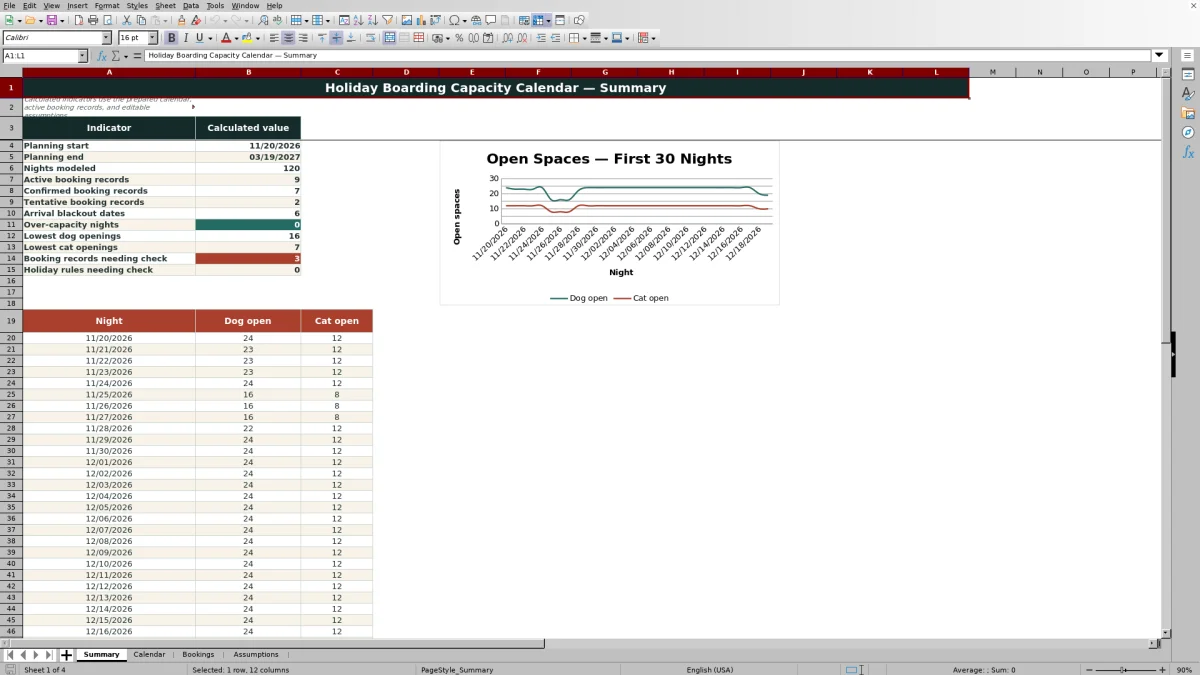
Use Calendar to inspect nightly caps, reservations, openings, and alerts. Then use Summary to review headline counts and the 30-night dog-and-cat openings chart before accepting, moving, or declining a request.
Situation: Seasonal Boarding Demand Changes by Date
A standard room limit may not describe what a boarding operation can safely schedule during every holiday period. Staffing, room configuration, and internal arrival policies can create lower seasonal caps or longer stay requirements. This holiday boarding capacity calendar organizes those changing constraints by boarding night instead of treating every date as identical.
Action: Define Standard Limits and Holiday Rules
Begin with the standard dog spaces, cat spaces, and minimum nights on Assumptions. Add a separate active rule for each holiday window that needs different caps, a different minimum stay, or an arrival blackout. Rules are applied to dates within their start and end ranges, and overlapping active rules are flagged because the calendar expects nonoverlapping holiday periods.
Action: Record the Demand That Uses Capacity
Each booking record includes arrival and departure dates plus separate dog and cat space quantities. A stay reserves capacity for the arrival night through the night before departure. The workbook adds both confirmed and tentative quantities to nightly demand, while a canceled record remains visible in the booking list without consuming space.
Result: Read Nightly Openings and Summary Indicators
Calendar subtracts reserved spaces from the applicable dog and cat caps to calculate remaining openings. A negative value indicates over-capacity demand, zero indicates that a category is at its limit, and a positive value shows how many spaces remain. Summary reports the lowest dog and cat openings, over-capacity nights, arrival blackout dates, booking counts, and records that need review.
Interpreted Practical Example
Situation: sample booking FIC-BKG-002 arrives November 25, 2026, departs November 29, requests two dog spaces, and is Tentative. Action: the workbook compares that four-night stay with the active Thanksgiving rule for November 25 through November 27, which sets an 18-dog cap, an 8-cat cap, a three-night minimum, and an Arrival blackout. Result: the tentative booking contributes two reserved dog spaces on each occupied night and meets the three-night minimum. Interpretation: the stay length is sufficient, but its November 25 arrival conflicts with the blackout and should be reviewed; the exact openings still depend on all other active bookings. Next decision: staff can keep the request tentative while considering a later arrival, revise the dates, or decline it under the internal scheduling policy.
Common Errors and Solutions
A Check duplicate ID result means an identifier appears more than once; assign a unique booking or rule ID. Check dates or Check horizon indicates missing, reversed, or out-of-range stay dates; correct the dates so arrival precedes departure and the stay fits the modeled calendar. Check inputs means a required rule or booking value is missing or invalid; complete the applicable dates, capacities, spaces, minimum, or status. Check overlap means multiple active holiday rules cover the same date; deactivate, shorten, or otherwise separate the ranges. Check over capacity means reserved demand exceeds a dog or cat cap; review affected bookings, statuses, dates, or the approved capacity assumption.
Comparison: Holiday Capacity Calendar Alternatives
The best tool depends on whether the immediate need is seasonal planning, a simple occupancy view, or full reservation administration.
| Approach | Seasonal caps and blackout rules | Booking checks | Best fit |
|---|---|---|---|
| Holiday boarding capacity calendar Excel workbook | Models date-specific dog and cat caps, minimum stays, and arrival blackouts | Flags duplicate IDs, date issues, minimum-stay conflicts, horizon issues, and capacity concerns | Internal holiday capacity planning with editable assumptions |
| Basic occupancy calendar | Usually shows booked or open dates but may not calculate changing caps or minimum stays | Typically requires manual review | A quick visual schedule when rules and capacity are simple |
| Standalone booking list | Stores reservation details but may not provide a nightly capacity model | Depends on the list or system configuration | Recordkeeping when nightly availability is calculated elsewhere |
| Reservation management system | May support broader policy, inventory, payment, and communication workflows | Varies by product and setup | Operations that need customer-facing booking and transaction functions |
This XLSX is the more focused planning decision tool when staff need transparent nightly calculations and editable holiday assumptions. It is not a substitute for a reservation platform, payment processing, customer communication, or staff approval.
Frequently asked questions
What does the holiday boarding capacity calendar calculate?
It calculates the applicable dog and cat caps, required minimum stay, arrival blackout status, reserved spaces, remaining openings, and capacity alert for each modeled night.
Do tentative bookings reduce available capacity?
Yes. Both Tentative and Confirmed records reserve dog or cat spaces in the nightly calendar. Canceled records do not reserve capacity.
How are boarding nights counted?
A booking occupies the arrival night and each following night through the night before departure. The departure date itself is not counted as an occupied night.
Can holiday rules overlap?
The workbook is designed for nonoverlapping active holiday rules. If active date ranges overlap, the rule and calendar checks flag the conflict for correction.
Does an arrival blackout remove pets already staying?
No. An arrival blackout applies to new arrivals on that date. Pets whose stays began earlier continue to count against nightly capacity.
Does the workbook automatically approve or reject bookings?
No. Its checks identify conditions for staff review, including blackout arrivals, minimum-stay issues, invalid inputs, duplicate IDs, horizon problems, and insufficient capacity. Final decisions remain with the operator.
Editorial responsibility

Tessa MarloweClient records and service workflows

Caleb HensleyWorkbook QA and operating controls