This mobile grooming route planner is an Excel workbook for ordering daily service stops by date, assigned groomer, and stop order. It combines appointment time windows, service duration, and manually entered travel allowance to calculate planned arrival, start, and end times.
The XLSX also summarizes service and travel hours for a selected date while flagging window conflicts, duplicate orders, incomplete inputs, and excessive planned hours. These warnings support human review; they do not automatically optimize a route or replace operational judgment.
How this workbook can help
- Builds a chronological schedule from stop order, appointment windows, service duration, and travel allowance.
- Separates service hours from travel hours so daily workload is easier to interpret.
- Surfaces window conflicts, duplicate orders, incomplete inputs, and groomer-hour concerns before dispatch.
- Summarizes active, confirmed, completed, and exception-related stop counts for a selected route date.
What is in the file
How to get started
1. Configure the planning assumptions
Open Assumptions and set the route day start, maximum planned hours per groomer, selected summary date, duration limits, travel limit, planning dates, and maximum stop order. Replace the fixed service, groomer, and status choices when needed.
2. Enter one mobile grooming stop per row
On Route Plan, provide the stop ID, service date, stop order, client, pet, service, address, time window, duration, travel allowance, assigned groomer, and status. Travel allowance represents time before the stop, including the first stop of a route.
3. Order and calculate the route
Sort active rows by service date, assigned groomer, and stop order. The formulas use that sequence to calculate planned arrival, start, and end times for each groomer-day route.
4. Review the schedule before dispatch
Check Window Check and Plan Alert, then use Summary to review stop counts and planned hours for the selected date. Review every alert and adjust the order, timing, travel allowance, groomer assignment, or status as appropriate.
How the mobile grooming route planner calculates a schedule
The first active stop for a groomer and date begins with the route day start from Assumptions plus that stop's travel allowance. For a later row with the same service date and groomer and a higher stop order, planned arrival uses the preceding row's planned end plus the next stop's travel allowance. Planned start is the later of arrival or window start, and planned end adds the service duration.
Practical example: interpreting a three-stop grooming route
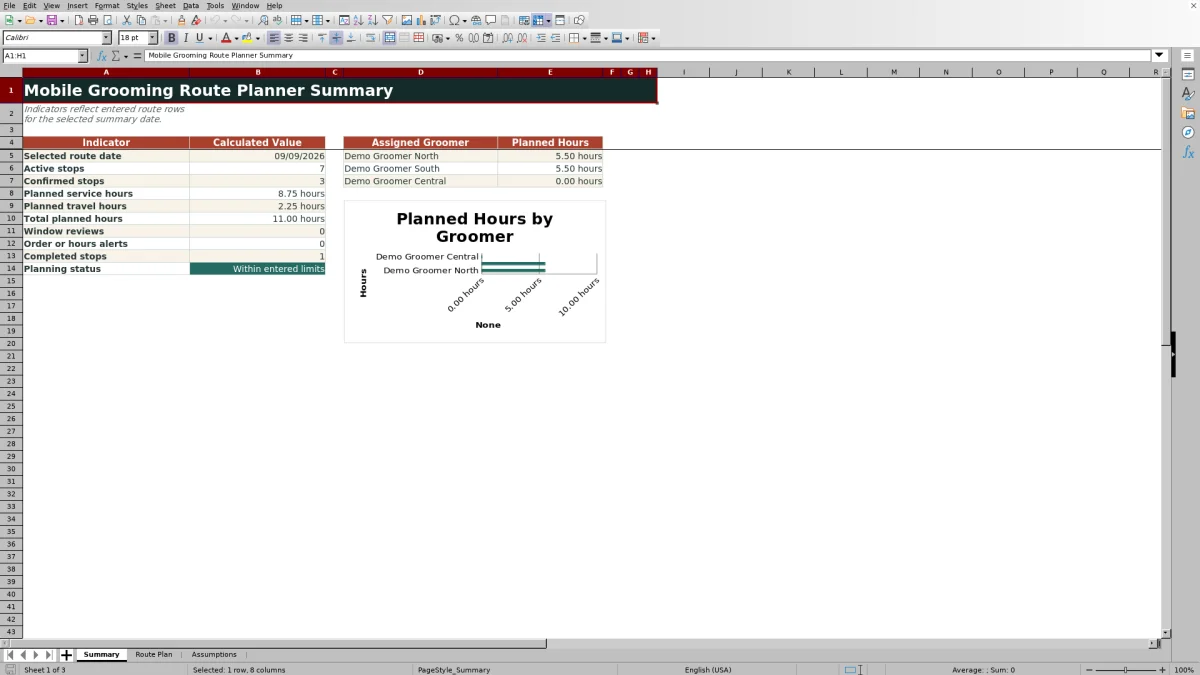
Situation: The fictional September 9 route assigns three stops to Demo Groomer North, beginning at 8:00 AM. The stops have service durations of 1.25, 1.50, and 1.25 hours and travel allowances of 0.50, 0.25, and 0.25 hours. Action: After the rows are placed in stop order, the workbook calculates an 8:30 AM arrival and 9:45 AM end for the first stop, a 10:00 AM arrival with a 10:15 AM window-adjusted start and 11:45 AM end for the second, and a noon arrival with a 1:15 PM end for the third. Result: All three calculated appointments fit their entered windows, with 4.00 service hours, 1.00 travel hour, and 5.00 total route hours. Interpretation: The route fits the default nine-hour groomer limit, and the waiting period before the second appointment prevents an early start. Next decision: The planner can confirm the sequence or test another stop only after checking realistic travel allowances and operational needs.
Using time windows and travel allowances responsibly
A travel allowance is entered before every stop rather than calculated from an address or map. If arrival is earlier than the appointment window, planned start waits until the window opens. If the service starts or ends after the window closes, Window Check identifies the issue for review. The result is a time-based planning aid, not a traffic-aware routing engine.
Common errors and solutions
A Duplicate order alert means two stops share the same date, groomer, and stop order; assign unique order numbers and sort again. Check inputs means required scheduling values are missing or unusable; complete the date, order, groomer, status, windows, duration, and travel allowance. Review window calls for a timing decision, such as changing the sequence, confirming a wider customer window, or revising a realistic allowance. Review day hours means the groomer's combined service and travel hours exceed the configured daily maximum; reassign, shorten, or move work. Because canceled rows can interrupt the preceding-row sequence, place them below active stops or re-sort before reviewing times.
Comparison with calendars and map-routing alternatives
This workbook is most useful when the primary need is to combine grooming duration, customer windows, manually estimated travel, stop status, and groomer workload in one editable schedule. Its role differs from a generic calendar or a map-routing application.
| Planning need | This Excel workbook | Generic calendar | Map-routing application |
|---|---|---|---|
| Stop sequence | Uses manually assigned stop order and sorted rows | Uses manually arranged appointments | May optimize geographic order, depending on the application |
| Service windows and duration | Calculates starts and ends and flags window issues | Displays booked time blocks but may not test this route logic | Often emphasizes drive times rather than grooming-service constraints |
| Travel time | Uses a manually entered allowance before each stop | Usually requires a separate travel block | May estimate travel from roads, distance, and traffic |
| Daily workload | Totals service and travel hours by configured groomer | Requires visual review or separate reporting | May report route duration but not the workbook's groomer-hour rules |
| Best fit | Operational scheduling with explicit inputs and review alerts | Appointment visibility and reminders | Geographic routing and navigation |
Reading the selected-date summary
Summary uses the date selected on Assumptions to count active, confirmed, and completed stops and to total service, travel, and route hours. It also reports window reviews and selected order, input, or day-hours alerts. A separate chart compares planned hours for the three groomers listed in the workbook, helping the planner decide whether work appears uneven or exceeds the configured daily limit.
Planning boundaries and the next operational decision
The workbook does not geocode addresses, predict traffic, automatically sort rows, or find the shortest route. Client care notes and vaccination records are also outside its stated purpose. After reviewing calculated times and alerts, the next decision belongs to the planner: retain the sequence, revise an appointment window, update a travel estimate, move a stop, change the groomer, or hold or cancel the visit.
Frequently asked questions
Does the workbook automatically optimize the shortest driving route?
No. Stop order and travel allowance are entered manually, and active rows must be sorted by service date, assigned groomer, and stop order. A separate routing application may be needed for distance- or traffic-based optimization.
How is planned arrival calculated?
For the first applicable stop, planned arrival is the route day start plus that stop's travel allowance. For a later sorted stop with the same date and groomer and a higher order number, arrival is the preceding planned end plus the later stop's travel allowance.
How does the planner handle appointment time windows?
Planned start is the later of planned arrival or window start. The Window Check field flags a start or end that falls after the entered window end and also identifies an invalid window that does not end after it starts.
What happens when a stop is canceled?
Canceled stops are excluded from active-stop and planned-hours summary calculations. Move canceled rows below active stops or re-sort the route so they do not interrupt review of the sequential planned times.
Can the service, groomer, and status choices be customized?
Yes. The fixed choice cells on Assumptions can be replaced with business-appropriate values. The supplied validation ranges cover five services, three groomers, and five statuses.
Why are calculated route fields blank?
The formulas return blanks when required scheduling inputs are absent, canceled, or not valid numeric date, time, duration, or travel values. Complete the row using the accepted validation ranges and confirm that groomer and status are present.
Editorial responsibility

Tessa MarloweClient records and service workflows

Caleb HensleyWorkbook QA and operating controls