This pet birthday marketing calendar is an Excel workbook for planning owner-approved birthday outreach without mixing promotional activity into the service booking calendar. It organizes pet birthdays, consent, preferred channels, messages or offers, assignments, costs, outreach statuses, and sent dates in one dedicated spreadsheet.
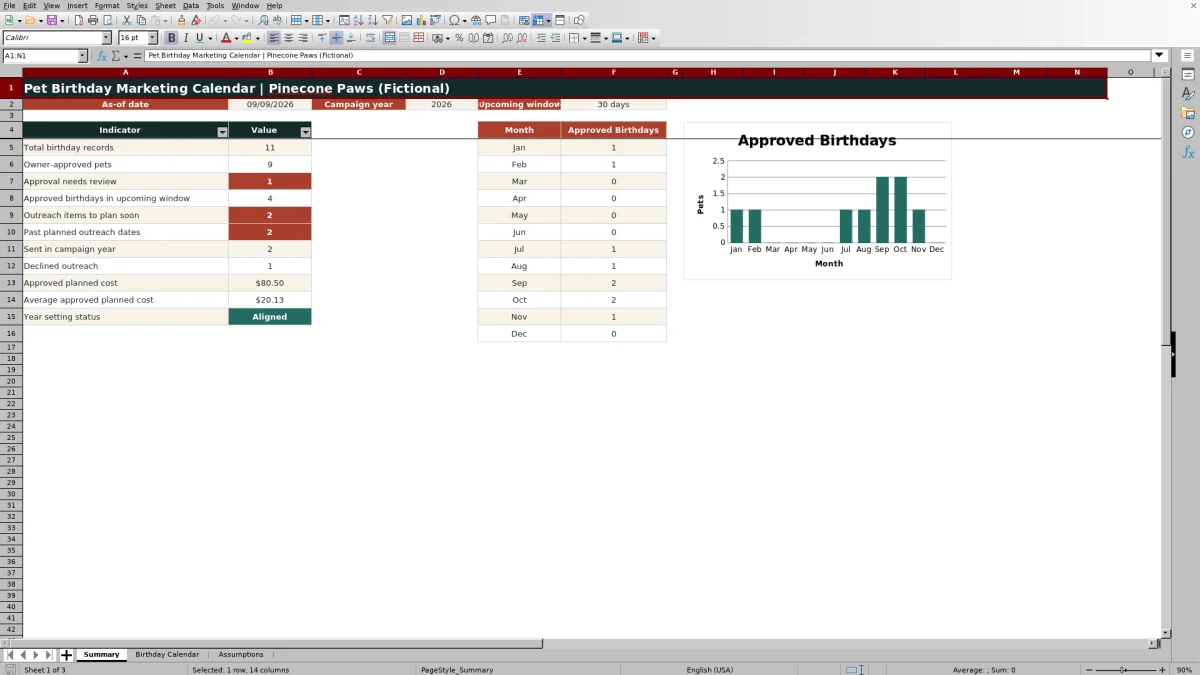
The workbook calculates each birthday in the campaign year and suggests an outreach date from the default lead time or an optional record-level override. A Summary sheet reports upcoming activity, approval issues, planned costs, completed outreach, and approved birthdays by month, while formula-driven alerts identify records that still need human review.
How this workbook can help
- Keeps optional birthday marketing separate from appointment and service-booking workflows.
- Helps staff respect owner approval before planning or sending a birthday message or offer.
- Makes upcoming birthdays, overdue planning dates, campaign costs, and completed outreach easier to review.
- Supports consistent team decisions through shared timing assumptions, statuses, channels, assignees, and review prompts.
What is in the file
How to get started
1. Set the campaign assumptions
Open the Assumptions sheet and confirm the as-of date, campaign year, upcoming review window, default lead days, cost review limit, and entry boundaries. Update the approval, status, channel, and assignee lists when operational choices change.
2. Enter and review birthday records
On the Birthday Calendar sheet, enter the record ID, owner and pet names, birthday, approval, preferred channel, message or offer, assignee, planned cost, and status. Add a lead-days override only when a record should use timing different from the default.
3. Resolve records that need attention
Review the calculated birthday, suggested outreach date, and Review Alert. Complete missing information, confirm approval, choose an appropriate channel and status, and investigate dates or costs that require human judgment before outreach proceeds.
4. Monitor and close the work
Use the Summary sheet to review upcoming approved birthdays, outreach that should be planned soon, past planned dates, monthly volume, and approved planned costs. After a message is sent, change its status to Sent and enter the actual sent date.
A Separate Calendar for Birthday Outreach
A birthday campaign has a different purpose from a service appointment schedule. This workbook gives the marketing task its own record set, timing logic, ownership, and completion status, helping a team plan optional greetings or offers without treating them as booked services. The separation also makes it easier to review consent and campaign cost before any communication is sent.
Consent, Channels, and Timing
Each record distinguishes owner approval from outreach status. Approved, Needs Review, and Declined values show whether contact may be considered, while Not Planned, Planned, Sent, and Skipped describe operational progress. Email, Postcard, Phone, and None are available as channel choices. The workbook then calculates the campaign-year birthday and subtracts either the default lead days or the record's override to suggest a planning date.
Practical Example: Interpreting Comet's Record
Situation: The sample record for Comet has an approved owner, a September 18 birthday, Email as the preferred channel, Planned status, and an $8.50 cost. Action: With campaign year 2026 and the 14-day default lead time, the workbook calculates September 18, 2026 as the birthday and September 4, 2026 as the suggested outreach date. Result: At the sample as-of date of September 9, the birthday falls within the 30-day upcoming window, but the planned outreach date has already passed. Interpretation: The record represents an upcoming approved birthday whose planned preparation date needs prompt human review; the $8.50 amount is also below the sample $25 cost review limit. Next decision: The assignee should decide whether the approved email is still timely, then either send it and enter the sent date or revise the status rather than leaving the item ambiguously planned.
Common Errors and Solutions
A blank owner, pet, or birthday creates an incomplete record, so supply the missing required details before planning. Needs Review requires a consent decision, while Declined means outreach should not proceed. A blank channel or None requires a suitable approved channel if contact is intended. A Sent status without a sent date should be corrected by entering the actual date. Birthday, sent-date, lead-day, and cost values outside the configured validation boundaries should be corrected or, when policy genuinely changes, addressed through a deliberate review of the Assumptions settings.
Comparison with a Service Booking Calendar
The Excel workbook is a separate planning layer, not an alternative source of appointment availability or service records.
| Calendar | Primary purpose | Tracks | Does not replace |
|---|---|---|---|
| Pet birthday marketing calendar | Plan optional, owner-approved birthday communication | Birthdays, consent, channels, lead time, messages or offers, assignments, costs, statuses, alerts, and sent dates | Appointment scheduling, service capacity, and booking operations |
| Service booking calendar | Schedule and manage client services | Appointment dates, service times, availability, and booking activity | Consent-based birthday campaign planning and marketing follow-up |
Using each calendar for its intended job avoids duplicate scheduling while preserving a clear record of optional marketing activity.
Reading the Summary Dashboard
The Summary sheet combines the as-of date, campaign year, and upcoming window with indicators for total records, approved pets, approvals needing review, upcoming approved birthdays, near-term planning work, past planned outreach dates, sent items, declined outreach, and approved planned costs. Monthly approved-birthday counts and the accompanying chart help users see seasonal workload, but the underlying records should still be checked before decisions are made.
Turning Review into the Next Decision
Begin with consent, then evaluate timing, channel, responsibility, cost, and status. A clean alert does not substitute for judgment; it indicates that the entered values satisfy the workbook's formula logic. The next operational decision is whether to plan, send, skip, or defer the outreach, after which the status and sent date should be updated so the dashboard reflects the current campaign position.
Frequently asked questions
What is the pet birthday marketing calendar used for?
It is used to plan optional birthday greetings or offers for pets whose owners have approved outreach, while keeping that work separate from service bookings and appointments.
Does the workbook calculate outreach dates automatically?
Yes. It calculates each pet's birthday in the selected campaign year and suggests an outreach date using the default lead days or a record-level override.
How should a Declined approval be handled?
A Declined record should not be used for birthday outreach. Keep the approval value current and use the record and alert logic to prevent the item from being treated as an approved campaign contact.
What should I do when a Review Alert appears?
Check the record for missing required information, settings problems, unresolved or declined approval, an unsuitable channel, a missing status or sent date, timing concerns, or a cost that needs human review. Correct the data or make the appropriate operational decision before proceeding.
Does this Excel workbook replace a service booking calendar?
No. It supports birthday marketing planning only and does not manage appointment availability, service capacity, or client bookings.
Editorial responsibility

Tessa MarloweClient records and service workflows

Caleb HensleyWorkbook QA and operating controls