This pet care shift handover schedule is an Excel workbook for assigning handover windows and accountable staff between facility shifts. It records the outgoing and incoming leads, care area, shift transition, priority, handover details, status, and completion time so teams can maintain accountable shift coverage.
The XLSX includes a 100-row working schedule, configurable assumptions, validated entry fields, calculated window durations, review alerts, and a summary of entered activity. Its included business name, staff names, and sample handovers are fictional and can be replaced with facility-specific information.
How this workbook can help
- Clarifies responsibility by identifying both the outgoing and incoming lead for every entered handover.
- Promotes consistent schedule entries through controlled lists for shifts, areas, staff, priorities, and statuses.
- Surfaces duplicate IDs, missing fields, questionable shift selections, window issues, and incomplete completion records for human review.
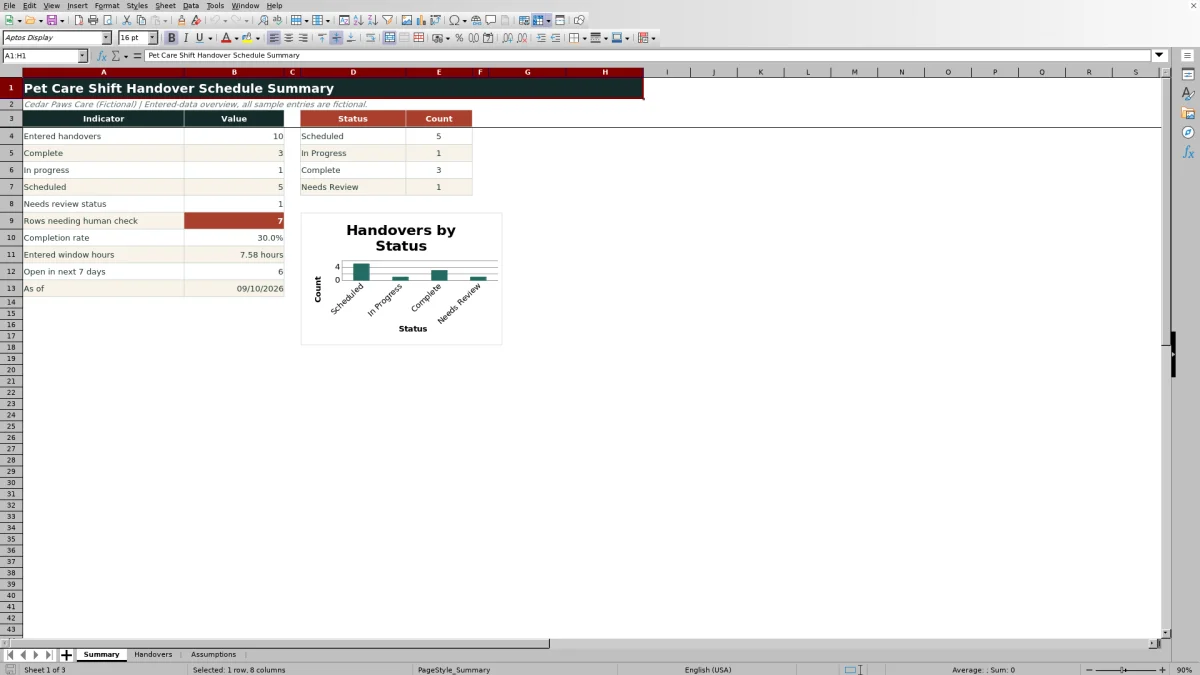
- Provides an entered-data overview of completion, upcoming open handovers, total window hours, and status distribution.
What is in the file
How to get started
1. Configure the planning assumptions
Review the Assumptions sheet and replace the fictional business label, staff names, care areas, shifts, statuses, priorities, target hours, and schedule date boundaries where appropriate.
2. Enter each scheduled handover
Use one row per handover on the Handovers sheet. Add a unique ID and date, then select the area, outgoing shift, incoming shift, outgoing lead, incoming lead, priority, and status from the available validated lists.
3. Define the window and care details
Enter the window start and end times and describe the information that must pass between shifts. Review the calculated Window Hours and Target Max Hours values to determine whether the planned duration remains within the selected priority target.
4. Complete and review the record
Add a completion timestamp when the handover is finished, update its status, and check the Review Alert column for issues requiring attention. Use the Summary sheet to monitor completion, open handovers in the next seven days, total entered hours, review counts, and the status chart.
Plan Accountable Pet Care Shift Handovers
A facility handover can involve lodging counts, pickup notes, enrichment supplies, room resets, or owner-provided care information. The workbook places the date, care area, shift transition, outgoing lead, incoming lead, scheduled window, priority, details, and status in one record so responsibility does not depend on an informal note alone.
Configure the Schedule Before Entry
The Assumptions sheet supplies the business label, earliest and latest schedule dates, shifts, facility areas, priorities, target maximum hours, statuses, and accountable staff used by the working sheet. Updating these editable lists first helps the validated fields reflect the facility's operating structure while retaining consistent schedule inputs.
Practical Example: From Situation to Next Decision
Situation: the fictional sample schedules a General Care handover from the Overnight shift to the Day shift on September 9, 2026, with Morgan Vale as outgoing lead and Riley Brook as incoming lead. Action: they use the 6:30 AM to 7:00 AM window to pass along morning attendance changes and enrichment supply information, with High priority selected. Result: the workbook calculates a 0.50-hour window, matching the 0.50-hour target for High priority and therefore not meeting the formula's condition for a long-window alert. Interpretation: the planned duration is at the target, but the In Progress status shows that the handover has not yet been recorded as complete. Next decision: the incoming lead should confirm the information, update the status when the exchange is finished, and enter the completion timestamp.
Common Entry Errors and Solutions
The formula-driven review alerts identify several conditions that need a person to check the row. Replace a duplicate Handover ID with a unique value; complete any missing required fields; choose different From Shift and To Shift values when a real transition is intended; correct start and end times when the calculated window is zero; shorten or deliberately reassess a window that exceeds its priority target; and add a Completed At value when the status is Complete. These alerts guide review but do not independently verify facility activity.
Pet Care Handover Schedule Comparison
The workbook is strongest when a team needs structured scheduling and entered-data control in Excel. It is not a substitute for software that sends notifications or verifies work outside the file.
| Approach | Assignment method | Validation and review | Reporting | Best fit |
|---|---|---|---|---|
| This Excel workbook | Records outgoing and incoming leads in each handover row | Uses date, time, and list validation plus formula-driven review alerts | Includes calculated indicators and a status chart | Facilities that want structured, editable handover tracking in an XLSX |
| Blank paper or static form | Assignments are written manually | No automatic validation or formula checks | Totals and trends must be compiled manually | Small or temporary workflows where offline simplicity matters most |
| Dedicated operations platform | Capabilities depend on the selected system and configuration | May support workflow rules, notifications, or external verification | May provide broader real-time reporting | Organizations requiring messaging, integrations, or automated operational workflows not included in this workbook |
Interpret the Summary Indicators
The Summary sheet counts entered handovers and records marked Scheduled, In Progress, Complete, or Needs Review. It also calculates the completion rate, sums entered window hours, counts rows with review-related alerts, and identifies non-complete handovers dated from today through the next seven days. Because the as-of date and upcoming count use Excel's TODAY function, date-sensitive results change when the workbook recalculates.
Use the Results to Make the Next Scheduling Decision
After reviewing the summary and row-level alerts, coordinators can decide which upcoming handovers need reassignment, which windows need adjustment, and which completed records need timestamps. Priority limits remain editable planning targets, so a flagged duration should lead to a human review of the care context rather than an automatic conclusion that the handover was improper.
Frequently asked questions
How many handovers can the Excel schedule hold?
The Handovers sheet provides 100 entry rows, covering rows 3 through 102.
Can I replace the fictional facility and staff information?
Yes. The business label, accountable staff, shifts, care areas, priorities, target hours, statuses, and schedule date boundaries are maintained on the Assumptions sheet and can be edited.
Does the workbook send reminders or confirm that a handover occurred?
No. The workbook calculates indicators and displays review alerts based only on entered data; it does not send messages or verify activity outside the file.
How does the schedule handle a window that crosses midnight?
The Window Hours formula uses the start and end times with a calculation that accommodates a time window continuing past midnight.
What causes a handover row to require review?
The Review Alert formula checks for duplicate IDs, missing required fields, matching outgoing and incoming shifts, zero-length windows, windows exceeding the selected priority target, and Complete records without a completion timestamp.
Editorial responsibility

Tessa MarloweClient records and service workflows

Caleb HensleyWorkbook QA and operating controls