This pet complaint resolution log is an Excel workbook for documenting client concerns about pet services from receipt through closure. It creates a centralized complaint record for the category, facts reported, assigned owner, response, remedy, status, follow-up, and closure date.
The XLSX also calculates category-based target dates and resolution or open days, displays checks that require human review, and summarizes complaint counts, remedy amounts, closure performance, statuses, and categories. Editable assumptions control the reporting date, category targets, statuses, owners, and follow-up choices.
How this workbook can help
- Keeps complaint facts, responses, remedies, ownership, follow-up, and closure details together.
- Uses category targets and an editable as-of date to support consistent timing reviews.
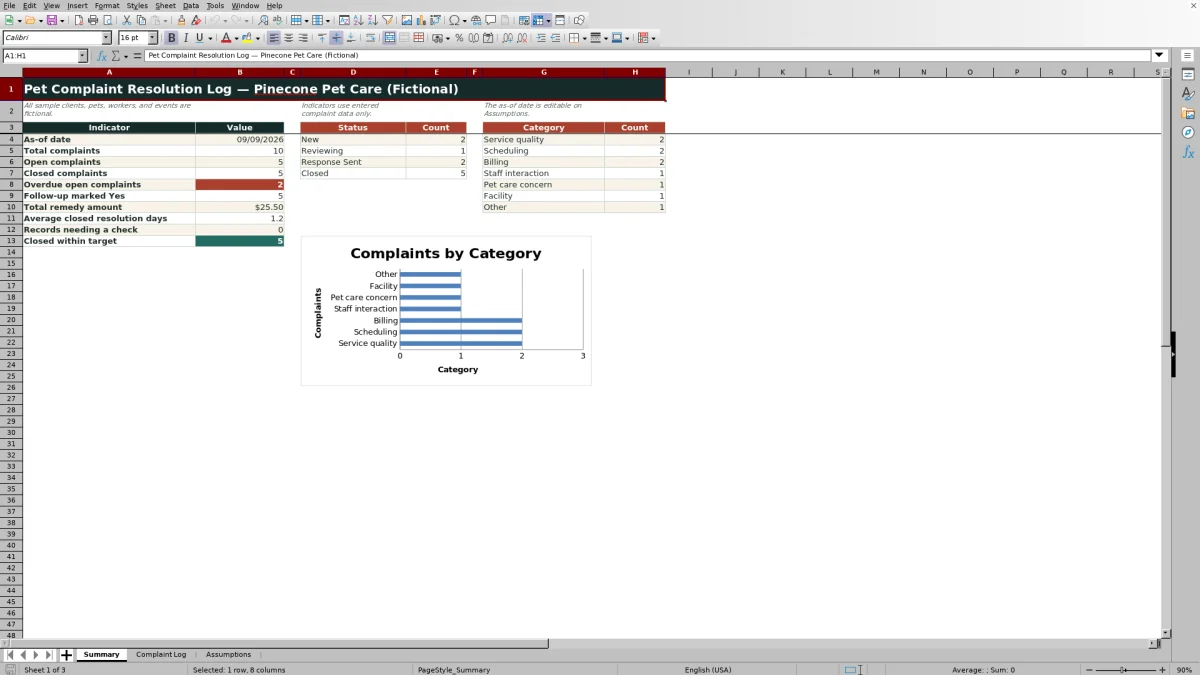
- Summarizes open, closed, overdue, follow-up, remedy, and resolution information for management review.
- Provides prepared lists and validation that help users enter categories, owners, statuses, follow-up choices, and remedy amounts consistently.
What is in the file
How to get started
1. Review the assumptions
Open the Assumptions sheet and confirm the as-of date, category target days, statuses, assigned complaint owners, and follow-up choices. Edit existing list entries rather than extending the prepared ranges.
2. Record the complaint
On the Complaint Log, enter a complaint ID, received date, client reference, pet, category, and objective facts reported. Select the assigned owner from the prepared list.
3. Document the response and remedy
Add the first response date, response summary, remedy or action, any nonnegative remedy amount, current status, and follow-up information.
4. Review calculated timing
Check the target calendar days, target date, resolution or open days, and Timing Check. Investigate any overdue or data-check message rather than treating it as a final determination.
5. Close and monitor the record
When the matter is resolved, select Closed and enter the closure date. Then review the Summary sheet for status counts, category totals, remedy amounts, timing results, and records needing attention.
What the Pet Complaint Resolution Log Records
The workbook turns each concern into a consistent record with a complaint ID, received date, client reference, pet, complaint category, facts reported, assigned owner, first response, response summary, remedy or action, remedy amount, status, closure date, and follow-up note. Four calculated columns add target calendar days, a target date, resolution or open days, and a timing check without replacing the owner's judgment.
Interpreted Practical Example
Situation: the fictional billing example records a complaint received on August 28, 2026 about an extra brushing charge. Action: the assigned owner explains the recorded service, requests manager review, and proposes an $18 partial refund. Result: the record remains at Response Sent with follow-up marked Yes because client acceptance still needs confirmation. Interpretation: Billing has a three-calendar-day target, so the complaint is beyond its August 31 target when evaluated against the September 9 as-of date and warrants human review. Next decision: the owner should confirm whether the client accepts the proposed refund, update the action and follow-up note, and enter Closed with a closure date only when the matter is actually resolved.
How Target Dates and Timing Checks Work
The Complaint Log retrieves the target number of days associated with the selected category and adds it to the received date. Resolution or open days are based on the closure date for a closed complaint or the editable as-of date for an open complaint. These calendar-day targets are planning aids, while messages such as an overdue warning, required check, status check, as-of-date check, or date check direct a person to inspect the underlying record.
Common Errors and Solutions
Blank calculated outputs often mean the complaint ID, received date, category, owner, or status is missing; complete the required record fields and use the prepared lists. An unrecognized pasted category can prevent the target lookup, so reselect a valid category from the drop-down. A Closed status without a closure date requires correction by entering the actual closure date or restoring the proper open status. A response date before receipt, a future received or response date relative to the as-of date, or an unapproved status can trigger a check; verify the source information and correct the entry. Preserve the prepared formulas in columns M, N, P, and Q so target and review outputs continue to work.
Comparison: Excel Log, Free-Form Notes, and Dedicated Systems
This Excel template is more structured than informal notes but less automated than a dedicated complaint-management platform. The appropriate alternative depends on record volume, collaboration requirements, and whether the organization needs system-driven workflow beyond the workbook's prepared 100 complaint rows.
| Criterion | This Excel log | Free-form notes | Dedicated system |
|---|---|---|---|
| Record structure | Consistent fields, prepared choices, and calculated timing | Flexible but dependent on each writer | Typically structured through configured forms |
| Summary reporting | Built-in indicators, counts, and one category chart | Usually requires manual review | May offer configurable reporting, depending on the product |
| Workflow automation | Formula-based checks that still require human review | No built-in workflow | May support routing, alerts, or permissions |
| Best fit | A defined spreadsheet process using up to 100 prepared complaint rows | Occasional unstructured reference notes | Higher-volume or multi-user processes needing stronger workflow controls |
Using the Summary for the Next Decision
The Summary sheet provides a management view of total, open, closed, and overdue open complaints, as well as follow-ups marked Yes, total remedy amount, average closed resolution days, records needing a check, and complaints closed within target. Status and category counts help users decide whether to follow up on individual records, review a recurring complaint category, examine remedy spending, or reassess planning targets.
Maintaining Reliable Complaint Records
Use factual language, avoid unsupported conclusions, and update status, remedy, follow-up, and closure information as the situation changes. Confirm the as-of date before reviewing open-day or overdue results, keep the prepared formula columns intact, and treat every timing or data-check message as a prompt for human review. Because the included sample clients, pets, workers, and events are fictional, replace them with appropriately handled working information under the organization's privacy and recordkeeping practices.
Frequently asked questions
How many complaint records does the Excel workbook support?
The prepared Complaint Log contains 100 working rows, from row 4 through row 103, with formulas and entry controls already applied.
Are target dates based on calendar days or business days?
Target dates use calendar days from the date received. The target for each complaint category is editable on the Assumptions sheet.
What makes an open complaint appear overdue?
An open complaint can be identified as overdue when its calculated target date has passed relative to the editable as-of date, assuming the required record fields and status are valid. The warning still requires human review.
Can the complaint categories, owners, and statuses be changed?
Yes. The Assumptions sheet contains editable entries for categories, target days, owners, statuses, and follow-up choices. Edit the existing entries so the prepared validation ranges remain intact.
Does this template replace a complaint-management system?
No. It is a structured Excel tracking aid with formulas, validations, summary indicators, and review prompts. It does not provide the broader workflow automation that may be available in a dedicated system.
Editorial responsibility

Tessa MarloweClient records and service workflows

Caleb HensleyWorkbook QA and operating controls