This Excel workbook organizes the response when a pet is reported missing during service. It connects each case to a controlled call tree, contact-attempt history, assigned response actions, due times, and resolution details.
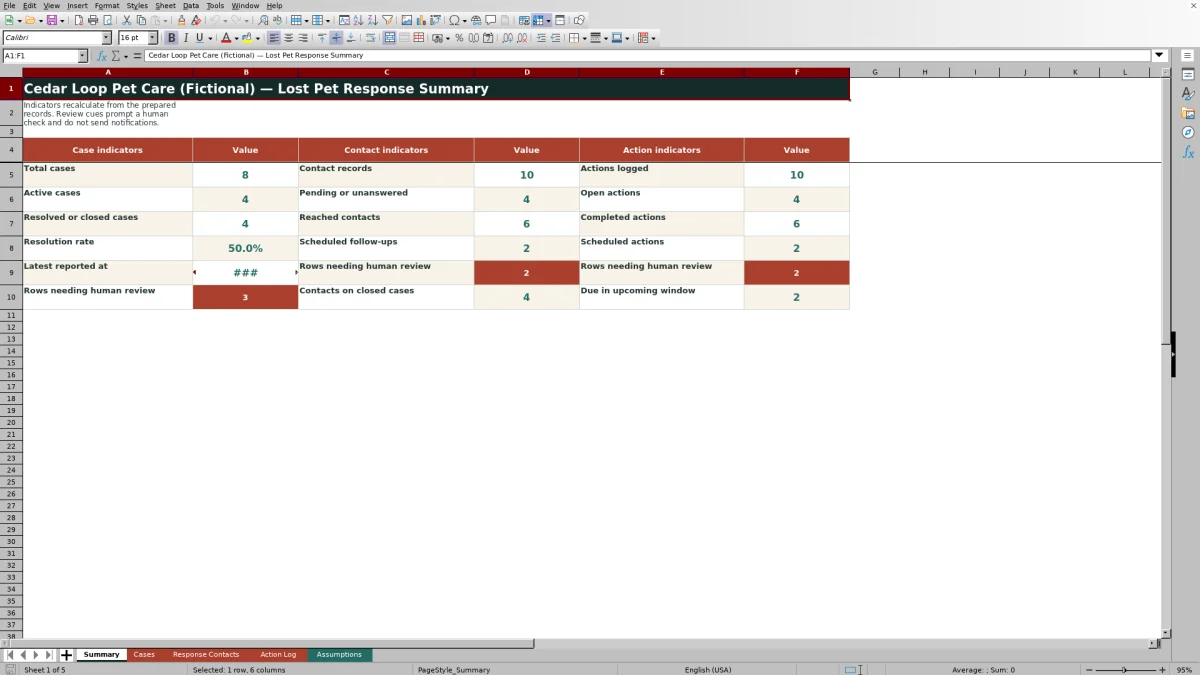
The XLSX includes separate sheets for cases, response contacts, actions, summary indicators, and editable assumptions. Formula-driven cues help staff identify records requiring review, but the workbook does not place calls, send notifications, track pets, or update outside services.
How this workbook can help
- Keeps missing-pet case details, contact attempts, and response actions connected through a shared case ID.
- Provides a consistent call order with contact roles, assigned staff, attempt times, outcomes, notes, and follow-up times.
- Calculates case review deadlines and displays human-review cues for overdue, incomplete, or inconsistent records.
- Summarizes active and closed cases, contact outcomes, open actions, scheduled work, and resolution rate.
What is in the file
How to get started
1. Open the case
Enter a unique Case ID, the report time, pet and client references, service type, last-seen location, assigned lead, response priority, and current case status on the Cases sheet.
2. Build the contact order
Add one row per person or organization on the Response Contacts sheet. Link every row to the case, assign a call-order number, and record the contact method, responsible staff member, status, attempt times, and notes.
3. Record response actions
Use the Action Log for site checks, search assignments, staff briefings, contact attempts, and other listed action types. Update the assignee, status, completion time, next-action due time, and result as work progresses.
4. Review and close
Check the Summary sheet and the review alerts on each operational sheet. Correct incomplete or inconsistent entries, update the case when the pet is found, enter the resolution time, and close or cancel remaining work as appropriate.
A Controlled Lost Pet Response Record
The workbook centers the response on a case record containing the report time, pet name, client reference, service type, last-seen location, assigned lead, priority, status, and resolution time. Related contact and action rows use the same case ID, creating a traceable human call order and activity history without claiming to automate communication or pet tracking.
Practical Example: From Report to Next Decision
Situation: the fictional LR-1002 record shows Juniper reported missing during pet boarding, with the case still open. Action: the owner contact is logged as attempted with no answer, a later attempt time is entered, and a search-area action remains in progress with its own due time. Result: the Summary can count the unanswered contact and open action while row formulas evaluate their timing. Interpretation: before the entered follow-up times, the records may appear scheduled; after those times pass, the formula cues can indicate that a human check is needed. Next decision: the assigned lead reviews the case, makes the next contact attempt, updates the search action, and records the actual outcome rather than treating the cue as an automatic response.
Priority Timing and Human Review Cues
The Cases sheet calculates a review deadline from the reported time and the selected response priority. The supplied assumptions use review intervals of 0.5 hour for Immediate, 1 hour for High, and 2 hours for Routine. Open hours continue to use the current spreadsheet time until a valid resolution time is entered, so staff should interpret every timing cue in the context of the live case.
Common Errors and Solutions
When a row displays CHECK DATE, confirm that required dates are present, within the accepted range, and in chronological order. ADD CLOSE TIME means a resolved or closed case needs a resolution timestamp, while ADD COMPLETE TIME means a completed action needs its completion timestamp. CHECK PRIORITY calls for a valid listed priority, CHECK CASE indicates that the linked case ID cannot be found, and CHECK TIME can identify an action completed before it was logged or a next contact attempt entered before the last attempt. In each situation, correct the source fields rather than overwriting the formula alert.
Comparison: Excel Workbook vs. Simpler Alternatives
This workbook offers more structure than a basic contact list but less automation than a dedicated messaging or tracking platform. The appropriate option depends on whether the team primarily needs an internal record, simple reference information, or integrated external communication.
| Option | Best suited for | Included capability | Important limitation |
|---|---|---|---|
| This Excel workbook | Coordinating cases, calls, and actions in one file | Linked case IDs, call order, timestamps, validations, formulas, alerts, and summary indicators | Requires manual entry and human review; it sends no messages and performs no tracking |
| Basic contact sheet | Keeping a short static list of names and phone numbers | Fast reference with minimal setup | Usually lacks case linkage, attempt history, due-time logic, and action tracking |
| Dedicated response platform | Organizations requiring integrated communication or external-system workflows | May provide messaging, notifications, permissions, or integrations depending on the product | Requires separate product evaluation, configuration, cost review, and privacy controls |
The Excel option is a practical middle ground when a team needs a controlled operational record but will continue making calls, sending messages, and conducting searches outside the workbook.
Consistent Entries Through Editable Controls
The Assumptions sheet supplies lists for service types, case statuses, priorities, contact roles, contact statuses, action types, action statuses, and assigned team members. It also stores accepted date limits, the maximum call order, priority review intervals, and the upcoming-action window used by the summary. These controls can be edited to reflect an internal process, although changes should be tested because operational formulas and validations refer to them.
What the Summary Can and Cannot Tell You
The Summary reports total, active, resolved, and closed cases; resolution rate; contact records and outcomes; action counts and statuses; scheduled follow-ups; upcoming actions; and rows needing review. These indicators help staff decide where to look next, but they do not verify that a call occurred, confirm a pet's location, judge search effectiveness, or replace the assigned lead's decision about the next response step.
Frequently asked questions
Does the Excel workbook automatically contact clients?
No. It records contact order, attempt times, statuses, notes, and follow-up times, but staff must place calls or send messages through their normal communication tools.
Can multiple contacts be linked to one missing-pet case?
Yes. Each response-contact row includes a case ID and call-order value, allowing multiple contacts to be arranged for the same case.
What do the alert columns mean?
They are formula-driven prompts for human review. Depending on the sheet and record, they can flag timing issues, missing completion or closure times, unknown case references, scheduled follow-ups, closed cases, or items that should be checked now.
Can the priority review intervals be changed?
Yes. The Assumptions sheet contains editable review intervals for Immediate, High, and Routine priorities. Changes should match the organization's approved process and be tested against active records.
Are the included names and contact details real?
No. The workbook identifies its sample business, people, phone numbers, email addresses, client references, locations, and activity records as fictional examples.
Editorial responsibility

Tessa MarloweClient records and service workflows

Caleb HensleyWorkbook QA and operating controls