This Pet Privacy Request Register is an Excel workbook for recording and monitoring access, correction, deletion, and other privacy requests involving pet care client records. Its Requests sheet captures the requester and pet references, request details, identity-check progress, assignment, priority, status, completion date, and administrative notes needed for a structured privacy request workflow.
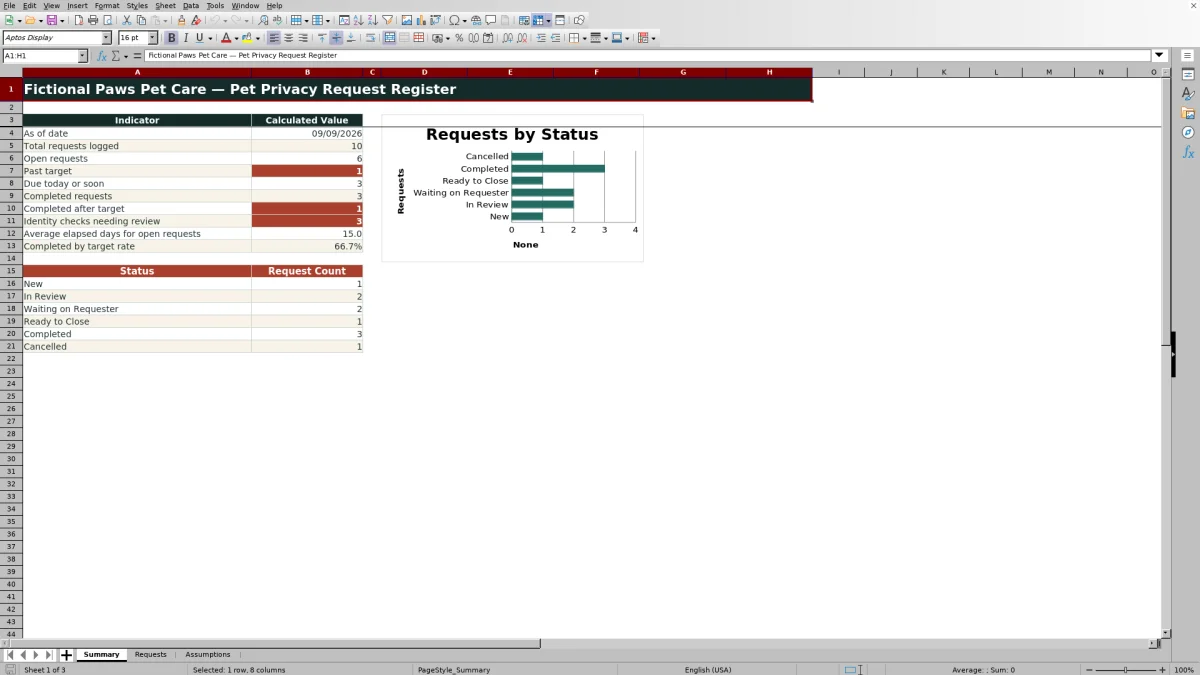
Built-in formulas calculate planning target dates, elapsed days, and deadline-check results, while the Summary sheet presents operational indicators and request counts by status. The Assumptions sheet lets users maintain request-type targets and stable choice lists, but all calculated dates are internal planning prompts that require human review rather than definitive legal deadlines.
How this workbook can help
- Centralizes up to 100 pet privacy requests in a consistent working register.
- Highlights open, upcoming, past-target, and completed requests for easier administrative follow-up.
- Reduces repetitive entry by calculating target days, target dates, elapsed days, and deadline results.
- Supports internal oversight with summary indicators, status counts, a chart, filters, and controlled choice lists.
What is in the file
How to get started
1. Review the planning assumptions
Open the Assumptions sheet and confirm the planning target days for Access, Correction, Deletion, and Other requests. Update the due-soon window, permitted date range, assignees, and choice lists as appropriate for your organization.
2. Log each privacy request
On the Requests sheet, enter a unique request ID, received date, requester reference, pet name, request type, request details, identity-check state, assignee, priority, status, and administrative notes. Use the available drop-down choices where provided.
3. Maintain progress and completion details
Update the identity check, assignment, status, and notes as work proceeds. When the status becomes Completed, enter the completed date so the workbook can calculate elapsed days and determine whether completion occurred by the planning target.
4. Review results and decide the next action
Use the Deadline Check column and Summary sheet to identify past-target requests, items due today or soon, identity checks needing review, and completed requests that exceeded their targets. Confirm each prompt against the underlying circumstances before escalating, closing, or documenting the request.
What the Pet Privacy Request Register Tracks
The workbook organizes each privacy request on the Requests sheet using 16 columns. Users can record a unique request ID, received date, requester reference, pet name, request type, request details, identity-check status, assigned team member, priority, workflow status, completed date, and administrative notes. Formula columns supply the target days, target date, elapsed days, and deadline check. Filters cover the full register from rows 5 through 104, and the heading row remains visible while users move through the list.
How Planning Dates and Deadline Checks Work
The Target Days formula looks up the selected request type on the Assumptions sheet. The Target Date then adds those days directly to the Received Date, meaning the calculation uses calendar-day addition rather than a documented business-day or holiday-adjusted method. For an open request, Elapsed Days counts from receipt through the current date; for a completed request, it counts through the completed date. Deadline Check results can identify items as past target, due today, due soon, completed by target, completed after target, cancelled, or needing a date or target review.
Interpreted Practical Example
Situation: Fictional request FPR-2026-001 is an Access request received on July 31, 2026, and Access has a 30-day planning target. Action: The request is logged with the identity check completed, assigned to Fictional Team Member A, and marked Completed with an August 28, 2026 completion date. Result: The workbook calculates an August 30 target date, 28 elapsed days, and a Completed by target result. Interpretation: The example was completed two calendar days before the internal planning target; it does not by itself establish compliance with a legal deadline. Next decision: A reviewer can confirm that the response package and administrative notes are complete before treating the matter as fully closed.
Common Errors and Solutions
Common errors: Reusing a request ID, leaving the completed date blank for a completed request, entering a completion date before the received date, selecting a request type without a valid target, or assuming that a planning date is a legal determination can produce warnings or misleading results. Solutions: Use a unique ID, complete both status and date fields together, correct reversed dates, verify request-type targets on the Assumptions sheet, and investigate any Check completion date or Check target result. Always compare workbook prompts with the actual request history and applicable requirements.
Comparison With a Basic List and a Task App
The register sits between an unstructured list and a general task-management system. The comparison below focuses on how each option supports this specific administrative process.
| Criterion | Pet Privacy Request Register | Basic spreadsheet list | General task app |
|---|---|---|---|
| Structured request fields | Includes dedicated privacy-request, requester, pet, identity-check, status, date, and notes fields. | Depends on columns created by the user. | Depends on available custom fields and configuration. |
| Target calculations | Looks up target days and calculates target dates, elapsed days, and deadline results. | Usually requires formulas to be designed and maintained. | May support due dates, but the calculation method varies by application. |
| Choice controls | Provides validated lists for request type, identity check, assignee, priority, and status. | May allow unrestricted and inconsistent entries. | Often supports controlled fields after setup. |
| Summary reporting | Includes calculated indicators, status counts, and one status chart. | Requires separate formulas or reporting work. | Reporting capabilities depend on the selected service and plan. |
| Best practical fit | A self-contained Excel workflow for a defined register of up to 100 requests. | A minimal log when calculations and controls are unnecessary. | A collaborative workflow when broader notifications, permissions, or integrations are required. |
Bottom line: This workbook offers more structure than a basic list, but it does not claim the broader collaboration or automation capabilities that a dedicated task platform may provide.
Using the Summary Sheet for Review
The Summary sheet reports the current date, total requests logged, open requests, past-target items, requests due today or soon, completed requests, completions after target, and identity checks marked Not started or Pending. It also calculates average elapsed days for open requests and the completed-by-target rate when sufficient data exists. Status counts draw from the six statuses maintained on the Assumptions sheet and feed the included chart, helping reviewers move from the overall workload to the specific records that need attention.
Controls, Assumptions, and Responsible Decisions
Validation rules check request-ID uniqueness, restrict date entries to the configured planning range, and provide lists for frequently used fields. The Assumptions sheet also controls the due-soon window and maximum permitted target value. These controls improve consistency but do not replace review: users should confirm local policies, contractual commitments, applicable legal requirements, pauses or extensions, and the factual circumstances of each request before making the next administrative decision.
Frequently asked questions
What types of privacy requests can this Excel register track?
The configured request types are Access, Correction, Deletion, and Other. Their planning target days can be edited on the Assumptions sheet.
How many requests can the workbook hold?
The Requests sheet provides 100 working rows, covering rows 5 through 104.
Does the workbook calculate legal privacy deadlines?
No. It calculates internal planning target dates by adding the configured target days to the received date. The workbook itself states that target dates and deadline checks are planning prompts requiring human review.
Does the target-date formula exclude weekends or holidays?
No documented weekend or holiday adjustment appears in the formula. The target date is calculated by adding the target-day value directly to the received date.
What should I do when a request is completed?
Set the status to Completed and enter the completed date. The workbook can then calculate elapsed days and classify the request as completed by target, completed after target, or needing a completion-date review.
Can the status, assignee, and planning options be customized?
Yes. The Assumptions sheet contains editable targets and lists for statuses, identity checks, priorities, and fictional assignees. Review dependent entries and formulas after changing those values.
Editorial responsibility

Tessa MarloweClient records and service workflows

Caleb HensleyWorkbook QA and operating controls