This Excel workbook records operational access windows for pet-care visits, including effective dates, permitted times, access methods, assigned workers, and review dates. It is designed for scheduling and oversight rather than storage of credentials.
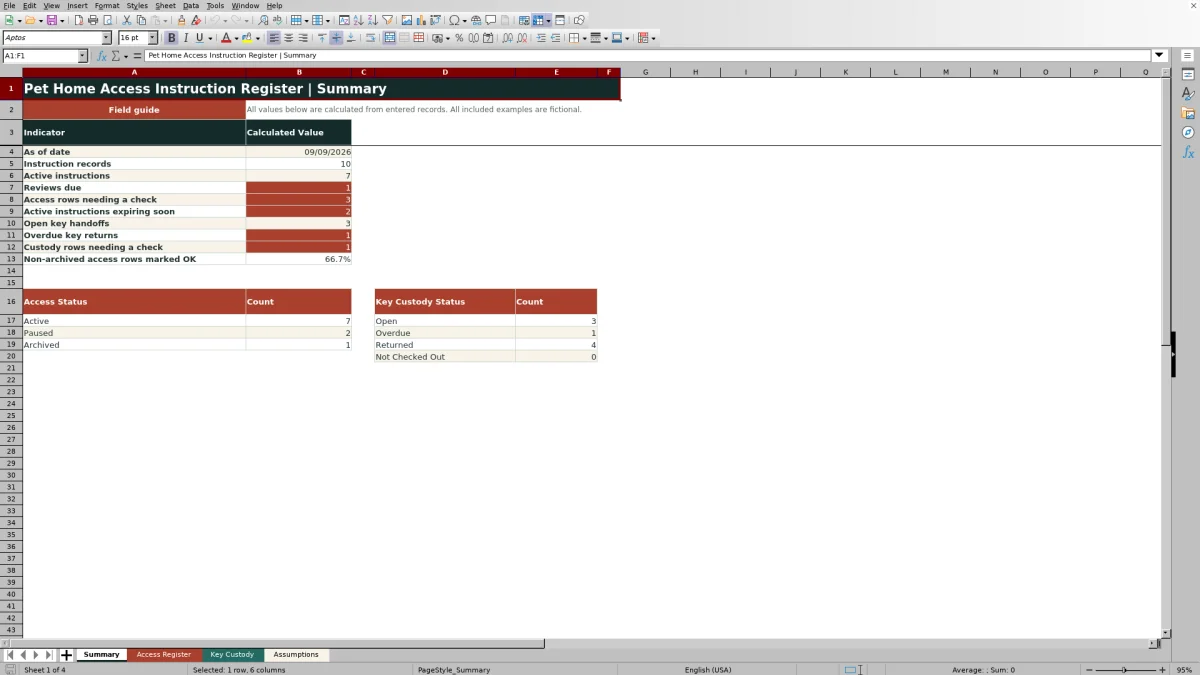
The XLSX keeps non-secret instruction references in the Access Register and tracks physical key handoffs separately in Key Custody. Its Summary sheet calculates review, expiration, custody, and data-check indicators from the entered records.
How this workbook can help
- Separates access-window records from physical key custody activity.
- Helps teams monitor reviews, upcoming expirations, open handoffs, and overdue key returns.
- Flags incomplete entries, inconsistent dates, invalid time windows, and record-linking issues for human review.
- Keeps secret codes and hiding locations outside the operational workbook while retaining non-secret references.
What is in the file
How to get started
1. Configure the workbook settings
Open Assumptions and confirm the review interval, expiration-warning horizon, maximum access-window length, allowed date range, and validation lists.
2. Enter an access record
In Access Register, assign a unique Access ID and enter the client, pet, home label, effective dates, allowed start and end times, non-secret instruction reference, access method, worker, status, and last-reviewed date.
3. Record business-key custody
If a physical business key is involved, add a separate Key Custody row with a unique Custody ID, key tag, linked Client ID and Access ID, holder, checkout time, expected return, condition, and non-secret handoff reference.
4. Review calculated exceptions
Use the Summary sheet and each row’s Check Needed result to resolve missing fields, date or time conflicts, unmatched links, overdue returns, and other conditions requiring attention.
Purpose and Operating Situation
Pet-care teams may need to know when a worker is authorized to enter a client’s home without placing sensitive credentials in a general operations file. This register addresses that situation by recording the applicable client and pet, effective period, same-day access window, assigned worker, access method, and a reference to instructions stored elsewhere. Key possession is documented on a separate sheet so authorization details and custody events are not mixed together.
Configure Review and Access Rules
The Assumptions sheet controls the calculations and validation lists used elsewhere in the workbook. Its sample settings specify a 90-day review interval, a 14-day warning horizon for active instructions nearing expiration, and a 12-hour maximum same-day access window. The editable lower and upper record dates limit accepted access and custody dates, while the listed statuses, methods, conditions, and fictional workers support consistent data entry.
Record Access Windows and Instruction References
Each Access Register row uses an Access ID to associate a client, pet, home label, effective start and end dates, allowed start and end times, and assigned worker. The instruction field is specifically for a non-secret document or system reference. Formulas add the configured review interval to Last Reviewed, convert the allowed time range into hours, and return an exception message when required information or a logical relationship needs attention.
Control Physical Key Handoffs
Key Custody records identify the key tag, client, linked Access ID, holder, checkout timestamp, expected return, actual return, condition, and non-secret handoff or storage reference. The calculated status is Returned when an actual return is entered, Not Checked Out when no checkout is present, Open while an unreturned key remains within its expected period, and Overdue after the expected return passes. Cross-sheet formulas also check whether the Access ID exists and whether its client matches the custody record.
Interpreted Practical Example
Situation: Fictional record ACC-EX-001 authorizes access for Comet Example from August 10, 2026, through January 7, 2027, between 9:00 AM and noon, using a Business Key assigned to Casey Sample. Action: The user confirms the non-secret reference, enters August 20, 2026, as the last review date, and links custody record CUS-EX-001 to the same client and Access ID. Result: With the sample assumptions, the workbook calculates a 3.00-hour window and a review-due date of November 18, 2026. The unreturned key is Open before its September 19 expected return and Overdue after that timestamp. Interpretation: The access period is internally consistent, but the physical key still requires active monitoring until a return is recorded. Next decision: Confirm the review before its due date and either enter the actual key-return timestamp or follow up on the overdue handoff.
Common Errors and Solutions
“Complete required fields” means one or more expected inputs are blank; complete the identified access or custody row and retain its unique ID. “Check date order” indicates that an access end precedes its start, while “Check access window” means the allowed end is not later than the allowed start; correct the source dates or times rather than overwriting calculated cells. “Check window length” appears when the same-day range exceeds the maximum configured on Assumptions; verify the window or adjust that setting only if policy permits. In Key Custody, “Check access ID” requires a valid Access Register link, “Check client / access” requires matching Client IDs, and return-related warnings require correction of timestamps that precede checkout. An Overdue status with no Returned value calls for follow-up or entry of the actual return time.
Comparison: Access Register vs. Key Custody
The two operational sheets are related but are not alternatives for the same data. The Access Register describes authorization and scheduling, whereas Key Custody documents possession of a physical key. Keeping both records linked by Access ID and Client ID supports review without combining secret instructions with handoff activity.
| Comparison area | Access Register | Key Custody |
|---|---|---|
| Primary subject | Authorized home-access period and permitted daily window | Physical key-tag possession and handoff history |
| Core identifiers | Access ID and Client ID | Custody ID, Key Tag ID, Client ID, and linked Access ID |
| Time information | Effective dates, allowed start and end times, and last review | Checkout, expected return, and actual return timestamps |
| Calculated outputs | Review Due, Window Hours, and Check Needed | Custody Status and Check Needed |
| Appropriate reference | Non-secret reference to separately secured instructions | Non-secret handoff or storage-log reference |
| Information to exclude | Door, alarm, lockbox, or safe codes and hiding locations | Access codes, secret instructions, and key hiding locations |
Frequently asked questions
Can I store a door, alarm, lockbox, or safe code in this workbook?
No. The workbook’s field guides direct users to enter only non-secret references and to keep codes, hiding locations, and other secret access details outside the file.
How is the access review-due date calculated?
The Access Register adds the Review interval in days from Assumptions to the Last Reviewed date. With the included sample setting, the interval is 90 days.
What causes a key record to become overdue?
A populated checkout with no actual return becomes Overdue when its Expected Return timestamp is earlier than the current date and time used by Excel.
Why does a row display Check Needed instead of OK?
The calculated field identifies missing required entries, invalid date or time relationships, an excessive access-window length, unmatched access and client links, or another condition that needs human review.
Can the validation choices and warning thresholds be changed?
Yes. The Assumptions sheet contains editable values and lists for review timing, expiration warnings, maximum access-window hours, date limits, access statuses, access methods, custody conditions, and worker names.
Editorial responsibility

Tessa MarloweClient records and service workflows

Caleb HensleyWorkbook QA and operating controls