This pet profile tracker is an Excel workbook for maintaining one operational record per pet. Its Pet Profiles sheet organizes identifiers, household details, primary and emergency contacts, species, description, birth date, weight, owner-supplied care notes, vaccine document dates, assigned staff, and current status.
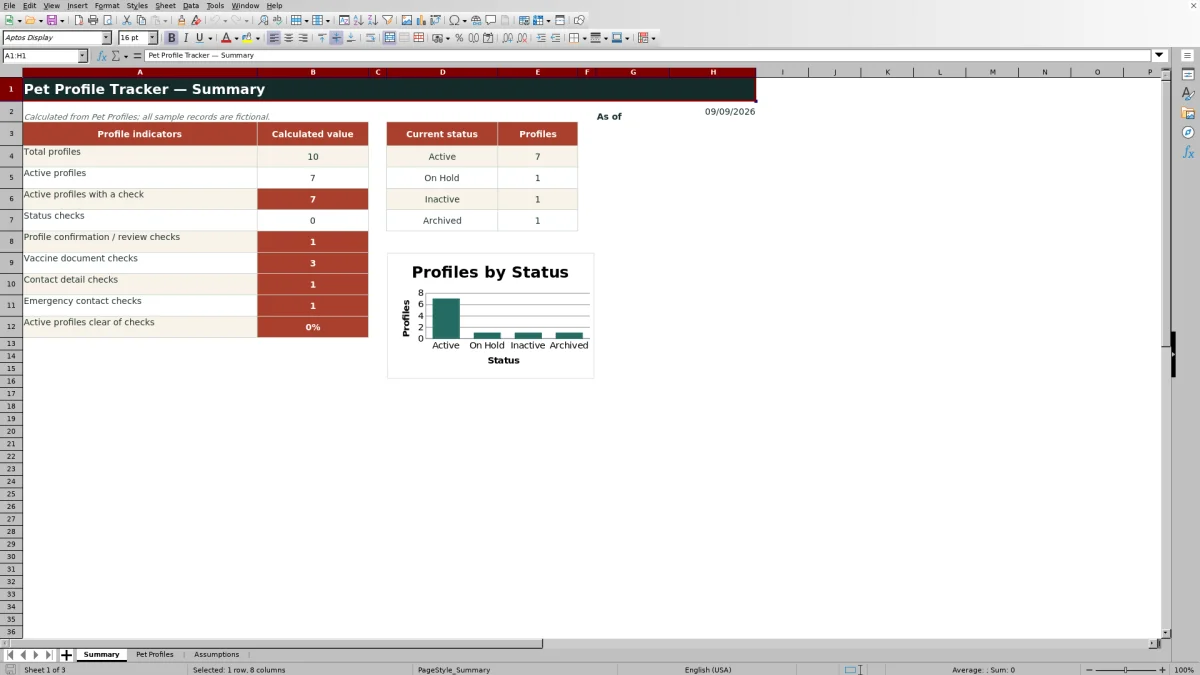
Built-in formulas calculate each pet’s next review date and display administrative prompts for incomplete or time-sensitive records. A Summary sheet turns those rows into counts, a status chart, and a percentage showing current status and follow-up needs, while the Assumptions sheet controls review timing, vaccine-document reminders, and approved list choices.
How this workbook can help
- Keeps pet, household, contact, care-note, assignment, and status information together in one operational row.
- Highlights records that may need contact, emergency-contact, confirmation, review-date, vaccine-document, or status follow-up.
- Calculates summary indicators and current-status counts without requiring users to build formulas from scratch.
- Lets teams adjust review timing, reminder timing, status choices, species choices, and fictional staff placeholders from a separate assumptions area.
What is in the file
How to get started
1. Review the operating assumptions
Open Assumptions and check the 180-day profile review interval, 30-day vaccine-document reminder window, and the Yes or No setting for requiring a vaccine date on active profiles. Update only the yellow editable cells and replace the fictional staff choices as appropriate.
2. Enter one pet per row
On Pet Profiles, use rows 5 through 104 for up to 100 prepared records. Enter a unique Pet ID, pet name, household, contact details, species, descriptive and administrative information, assigned staff, status, and the date the profile was last confirmed.
3. Resolve the displayed check
Review the calculated Next Review Due and Profile Check columns without overwriting their formulas. If a message appears, verify the corresponding source field with the appropriate person and correct or complete the record.
4. Use the summary to choose follow-up work
Open Summary to review total and active profiles, active records with checks, check categories, status counts, the status chart, and the percentage of active profiles clear of checks. Filter Pet Profiles by status or check message when deciding which records to review next.
A single operational view of each pet
The workbook is organized around a single-row profile: each populated row represents one pet and connects that pet to a household, primary contact, emergency contact, assigned staff member, and current status. This structure makes the tracker suitable for maintaining a current client-facing profile rather than scattering basic administrative details across unrelated lists.
The record also includes owner-supplied care notes and a vaccine-document-through date. These fields support administrative coordination only; the workbook explicitly does not provide veterinary guidance.
Fields, controls, and review logic
Pet Profiles provides fields for Pet ID, Pet Name, Household, Primary Contact, Phone, Email, Species, Breed or Description, Birth Date, Weight, Care Notes, Emergency Contact, Emergency Phone, Vaccine Document Through, Assigned Staff, Status, Last Profile Confirmed, Next Review Due, and Profile Check.
Dropdowns constrain species to Dog, Cat, or Other and status to Active, On Hold, Inactive, or Archived. Weight accepts values from 1 through 300 pounds, while date fields use defined date ranges. Next Review Due adds the configurable review interval to Last Profile Confirmed, and Profile Check evaluates active records for missing or time-sensitive administrative information.
Interpreted practical example
Situation: the fictional Maple Sample record is Active, was last confirmed on August 20, 2026, and has an owner-supplied vaccine document through October 10, 2026. Action: a staff member reviews the row on September 15, 2026, with the workbook’s 180-day review interval and 30-day reminder window unchanged. Result: Next Review Due calculates February 16, 2027, while the vaccine-document date is only 25 days away and can produce the relevant check. Interpretation: the message identifies an administrative verification point; it does not state that a vaccination is medically invalid or prescribe care. Next decision: the staff member should verify the document with the owner, update the recorded date if appropriate, and then review whether another prompt remains.
Common errors and practical solutions
A blank status produces “Check status.” For an active pet, missing primary-contact or phone information produces “Check contact details,” while missing emergency-contact information produces “Check emergency contact.” A blank confirmation date, a reached review date, or a missing or approaching vaccine-document date can also create a targeted message. These are prompts, not diagnoses.
Because Profile Check uses ordered logic, it may display the first applicable issue rather than every issue at once. Correct the displayed source field, allow Excel to recalculate, and then check the row again for a subsequent message. If a row is intentionally no longer active, select the accurate non-active status instead of deleting useful historical profile information.
Comparison with basic lists and larger systems
The tracker sits between an unstructured contact list and a specialized operational platform. Its main advantage over a plain worksheet is built-in review logic, but it does not claim to provide appointment scheduling, medical records, billing, or clinical decision support.
| Approach | Record structure | Follow-up support | Best fit |
|---|---|---|---|
| Pet Profile Tracker Excel workbook | One 19-field row per pet with prepared space for 100 profiles | Calculated review dates, profile-check prompts, summary metrics, filters, and a status chart | Teams that need a focused administrative profile register in Excel |
| Basic contact spreadsheet | Free-form rows and columns chosen by the user | Manual review unless users create their own formulas and controls | Very small lists with minimal consistency requirements |
| Specialized CRM or practice system | Database records connected to broader workflows | May offer deeper automation beyond this workbook’s documented scope | Organizations needing scheduling, billing, permissions, or integrated service records |
The Excel tracker is the practical alternative when structured profiles and visible follow-up prompts are needed without representing the workbook as a full business or veterinary management system.
Reading the Summary sheet
Summary counts all populated Pet IDs, active profiles, active profiles with a check, and records associated with status, profile-review, vaccine-document, contact-detail, or emergency-contact prompts. It also calculates the share of active profiles clear of checks and displays counts for Active, On Hold, Inactive, and Archived records.
Interpret the figures as workload indicators. A rising active-profile count may reflect growth, while a rising check count signals that more records require human review. The status chart shows portfolio composition, but the underlying rows should be filtered and examined before operational decisions are made.
Turning results into the next decision
Use the summary to identify the largest follow-up category, then filter Pet Profiles to the relevant status or Profile Check message. Confirm owner-supplied information, update the editable source fields, and let the formulas recalculate the result.
After corrections, review the percentage of active profiles clear of checks. If review or reminder timing creates too much or too little advance notice, adjust the permitted interval settings on Assumptions rather than editing formulas row by row. This preserves a consistent process while keeping the final decision with the responsible staff member.
Frequently asked questions
How many pet profiles are prepared in the workbook?
The Pet Profiles sheet has 100 prepared data rows, from row 5 through row 104, with formulas already present in the Next Review Due and Profile Check columns.
Which status options are included?
The validated status choices are Active, On Hold, Inactive, and Archived. The Summary sheet counts records in each of these categories.
How is the next profile review date calculated?
Excel adds the Profile review interval in days from Assumptions to the Last Profile Confirmed date. The supplied interval is 180 days and can be changed within the validated range of 30 to 730 days.
What can trigger a Profile Check message?
A message can be triggered by a blank status or, for an active profile, missing contact details, missing emergency-contact details, a missing confirmation date, a reached review date, or vaccine-document information that requires administrative review under the selected assumptions.
Does the tracker provide veterinary guidance?
No. Care notes and vaccine-document dates are owner-supplied administrative inputs. The workbook organizes those inputs and prompts human review but does not provide veterinary or clinical guidance.
Can the dropdown choices and reminder timing be changed?
Yes. The Assumptions sheet contains the profile-review interval, vaccine-document reminder window, vaccine-date requirement, status list, species list, and staff choices. Yellow cells are designated as editable.
Editorial responsibility

Tessa MarloweClient records and service workflows

Caleb HensleyWorkbook QA and operating controls