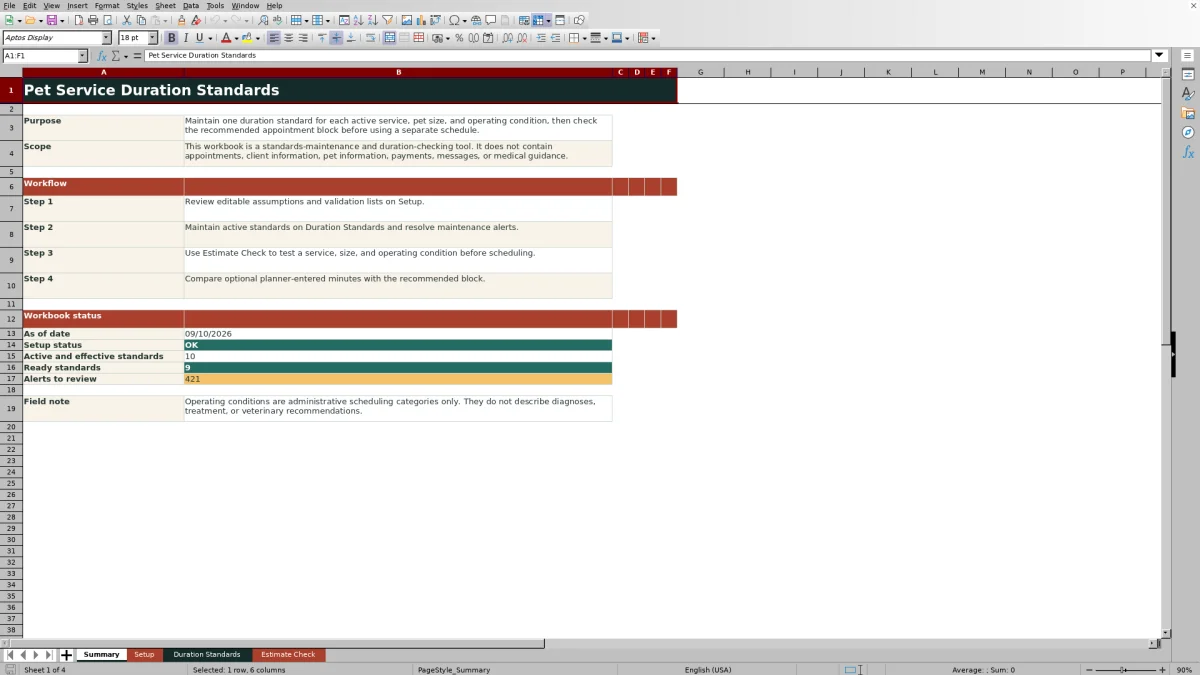
This Excel workbook maintains one duration standard for each active combination of pet service, pet size, and operating condition. It records standard minutes, optional turnover overrides, effective dates, review dates, and notes without storing appointments, client details, pet records, payments, or medical guidance.
The XLSX also checks selected combinations before scheduling. It finds the applicable active and effective standard, adds turnover time, rounds the total to the configured increment, and returns a recommended appointment block that can be compared with optional planner-entered minutes.
How this workbook can help
- Centralizes service-duration assumptions by service, pet size, and operating condition.
- Calculates consistent appointment blocks using configurable turnover and rounding rules.
- Surfaces duplicate, incomplete, out-of-range, future-dated, and overdue-review records.
- Lets planners compare proposed minutes with the applicable standard before using a separate schedule.
What is in the file
How to get started
1. Review the Setup assumptions
Confirm the as-of date, default turnover minutes, rounding increment, duration limits, review interval, turnover-override maximum, and available selection lists. Resolve any message shown for Setup status before relying on calculated results.
2. Maintain the duration standards
On Duration Standards, enter a unique Standard ID and select the active status, service, pet size, and operating condition. Add standard minutes, an optional turnover override, effective and review dates, and a short note where useful.
3. Resolve maintenance alerts
Review the Record Alert, Duration Alert, and Date and Review Alert columns. Correct duplicate active combinations, missing key fields, invalid durations, future effective dates, missing review dates, or overdue reviews until the intended active records are ready.
4. Check a proposed appointment block
On Estimate Check, select a service, pet size, and operating condition. Review the returned standard and recommended block, optionally enter planner minutes, and use the variance and result columns to decide which duration to carry into a separate scheduling system.
What the Excel Standards Workbook Does
The workbook separates standards maintenance from appointment scheduling. Duration Standards acts as the controlled source for service minutes, while Estimate Check tests a selected service, size, and condition before a planner uses the recommendation elsewhere. Operating conditions are administrative scheduling categories, not diagnoses, treatments, or veterinary recommendations.
Configurable Scheduling Rules
Setup contains the as-of date, default turnover minutes, rounding increment, minimum and maximum standard minutes, review interval, and maximum turnover override. The documented values are September 10, 2026; 10 default turnover minutes; a 5-minute rounding increment; a 5-to-240-minute standard range; a 180-day review interval; and a 60-minute override maximum. These are editable assumptions rather than universal service-duration recommendations.
Interpreted Practical Example
Situation: A planner checks Bath & Brush for a Small pet under the Routine condition. Action: The workbook finds the fictional 45-minute standard, uses the 10-minute default turnover because no override is shown, and rounds the 55-minute total to the configured 5-minute increment. Result: The recommended block is 55 minutes. If the planner enters 60 minutes, the variance is 5 minutes. Interpretation: The proposed block is five minutes longer than the calculated standard, so the result calls for review rather than silently replacing the planner's value. Next decision: The planner can use the 55-minute recommendation in a separate schedule or retain 60 minutes after confirming the operational reason.
Common Errors and Solutions
A “No active standard” result means the selected combination has no active, effective lookup key; add or activate the intended record and confirm its effective date. “Multiple active standards” means more than one active record uses the same service, size, and condition; deactivate or correct the duplicate. “Check standard” points to a record, duration, date, or review alert; correct missing fields, out-of-range minutes, future dates, or overdue reviews. “Check setup or standard” can appear when the recommended block cannot be calculated; verify the matching duration, turnover value, and positive rounding increment. “Review difference” means planner-entered minutes do not equal the recommendation; inspect the variance before deciding what to schedule.
Comparison With Alternatives
This XLSX is more controlled than a basic reference list but intentionally narrower than an appointment-management system. The distinction matters because the workbook calculates standards and checks proposed blocks without tracking actual bookings.
| Approach | Primary task | Validation and alerts | Appointment records |
|---|---|---|---|
| Pet Service Duration Standards Excel workbook | Maintains standards by service, pet size, and operating condition and calculates rounded blocks | Includes input validation plus duplicate, duration, effective-date, and review alerts | Not included |
| Basic spreadsheet list | Stores reference durations | Depends on how the user builds the list and may offer no automated checks | Not necessarily included |
| Appointment scheduling system | Creates and manages scheduled bookings | Varies by system | Typically central to its purpose |
Choose this workbook when the immediate need is governed duration maintenance and a pre-scheduling check. Choose a scheduling system when the need includes calendars, appointments, clients, pets, messages, or payments.
Standard Maintenance and Review
Each standard includes an active flag, effective date, last-reviewed date, and three calculated alert columns. The workbook treats a standard as ready when it is active, its record and duration alerts are OK, and its date and review status is Current. Summary and Setup aggregate these results so maintainers can see whether records need attention before planners rely on them.
Scope and Responsible Use
The sample entries are fictional baselines and should be reviewed against the organization's own staffing, workflow, service definitions, and scheduling policies. The workbook does not contain appointments, client or pet information, payments, messages, or medical guidance. Its output is an administrative duration recommendation for use in a separate scheduling process.
Frequently asked questions
What does the Pet Service Duration Standards Excel workbook calculate?
It retrieves one matching active and effective standard, adds either the record's turnover override or the default turnover minutes, and rounds the total upward to the configured increment to produce a recommended appointment block.
How many standards and estimate checks can the workbook hold?
Duration Standards provides 150 working rows, from rows 2 through 151, and Estimate Check provides 100 working rows, from rows 2 through 101.
What happens when more than one active standard matches?
Estimate Check reports multiple active standards and does not return a usable duration recommendation. Review the matching service, pet-size, and operating-condition records, then correct or deactivate the unintended duplicate.
Can turnover time vary by service standard?
Yes. A standard can contain an optional turnover override. If that field is blank, the estimate uses the default turnover minutes configured on Setup.
Does this workbook schedule appointments or store pet records?
No. It maintains duration standards and checks recommended blocks only. It does not store appointments, client details, pet information, payments, messages, or medical guidance.
Editorial responsibility

Tessa MarloweClient records and service workflows

Caleb HensleyWorkbook QA and operating controls