This recurring pet appointment calendar is an Excel workbook for setting up repeat pet services and generating future appointment dates. Each plan can include a pet, client label, service, start date, frequency, recurrence unit, occurrence count, preferred time, default staff, and plan status.
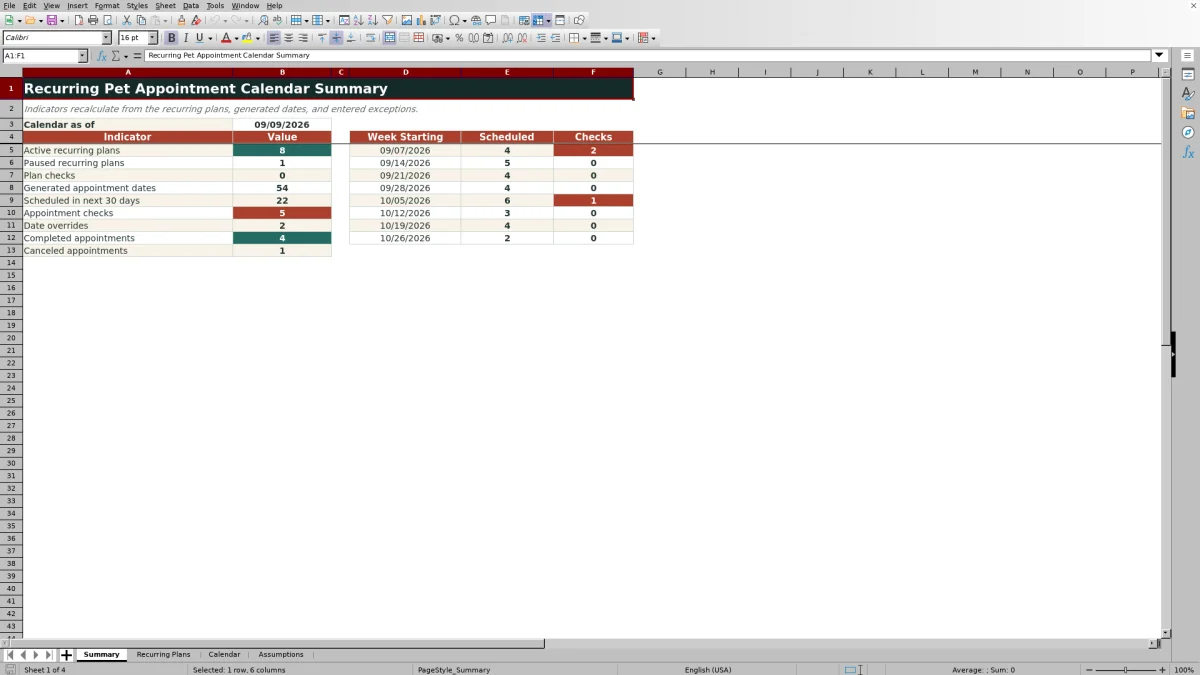
The generated calendar keeps the original planned date while allowing individual date, staff, status, and note changes. Plan-level and appointment-level checks support exception review, while the Summary sheet reports upcoming scheduled work, completed and canceled appointments, overrides, and weekly checks.
How this workbook can help
- Reduces repeated date entry by generating future appointments from active service plans.
- Separates the original recurring schedule from occurrence-level date, staff, status, and note changes.
- Flags incomplete plans, duplicate IDs, occurrence-limit issues, past series, overrides, and other appointments requiring review.
- Summarizes plan activity, upcoming scheduled appointments, exceptions, overrides, completions, and cancellations.
What is in the file
How to get started
1. Review the assumptions
Open the Assumptions sheet and confirm the as-of date, weekly summary period count, maximum occurrences, allowed appointment-date range, recurrence units, and available statuses.
2. Enter recurring service plans
On Recurring Plans, enter one plan per row with a unique plan ID, pet and client labels, service, start date, interval, unit, occurrence count, preferred time, default staff, and plan status.
3. Generate and adjust appointments
Set a valid plan to Active so its occurrences appear on the Calendar sheet. Review the planned and appointment dates, then use the date, staff, status, or note fields when one occurrence differs from the standard plan.
4. Resolve checks and make scheduling decisions
Review the Plan Review and Review Flag columns, confirm every deliberate change in the override cells, and use the Summary sheet to assess upcoming scheduled work and outstanding checks.
The situation: repeat services create scheduling complexity
Baths, nail trims, deshedding services, and other repeat appointments can follow different intervals. When every future date is entered manually, it becomes harder to distinguish the normal series from a one-time owner request, staffing change, cancellation, or appointment that still needs review. This workbook addresses that situation by storing the recurrence rule separately from each generated occurrence.
The action: define each recurring plan once
The Recurring Plans sheet accepts up to 100 plans. For each plan, enter its ID, pet name, client label, service, start date, interval, unit, number of occurrences, preferred time, default staff, and status. Recurrence units are Days, Weeks, and Months, and the occurrence limit can be configured from 1 through 12 on the Assumptions sheet.
The result: future appointment rows are generated consistently
An Active plan generates only the requested number of dates, up to the workbook limit of 12 occurrences. The Calendar carries forward the pet, service, preferred time, and default staff. Its Appointment Date uses the Date Override when one is present; otherwise, it uses the Planned Date. Assigned To and Appointment Status follow the same pattern by using an override when supplied and the plan default when no override is entered.
Practical example and interpretation
The fictional RPA-001 plan schedules Biscuit for a bath and brush every week beginning August 26, 2026, with eight occurrences at 9:00 AM and Staff A. The third planned occurrence falls on September 9, but its Date Override moves the appointment to September 10 and the note records that the owner requested a later day. The resulting appointment date is September 10, and the row receives an Exception - check flag. This does not mean the recurrence formula failed; it identifies a deliberate departure from the plan that should be confirmed before the schedule is treated as final.
Common errors and solutions
The Plan Review column can report incomplete inputs, a duplicate plan ID, an occurrence count above the configured limit, or an Active series ending before the as-of date. Complete the required fields, assign a unique ID, reduce the occurrence count to the allowed maximum, or decide whether an expired series should be updated, paused, or ended. On the Calendar, a past scheduled date should be resolved with the appropriate status or a valid date change. An exception flag caused by an override, note, cancellation, or Needs Review status should be checked and documented rather than erased automatically.
Comparison: recurring Excel workbook vs. a manual appointment list
The best approach depends on whether the schedule follows a repeatable rule or requires independent entry for every appointment.
| Approach | Primary strength | Tradeoff | Best fit |
|---|---|---|---|
| Recurring pet appointment Excel workbook | Generates dates from day, week, or month intervals and retains occurrence-level overrides. | Uses a fixed structure of 100 plans and no more than 12 occurrences per plan. | Repeat services that need consistent generation, exception flags, and summary counts. |
| Manual appointment list | Provides direct control over every individually entered appointment. | Every repeat date, change, and status must be entered and checked separately. | One-time services or highly irregular schedules that do not follow a stable recurrence rule. |
The next decision: use the summary to prioritize work
After reviewing the generated calendar, use the Summary sheet to decide what needs attention next. It reports active and paused plans, plan checks, generated dates, scheduled appointments in the next 30 days, appointment checks, date overrides, completions, and cancellations. The weekly view then shows scheduled volume and checks for up to eight periods, helping distinguish ordinary workload from records that require confirmation.
Frequently asked questions
How many recurring plans and appointments does the workbook support?
The Recurring Plans sheet provides 100 plan rows. The Calendar provides 12 occurrence slots for each plan, for a total capacity of 1,200 generated appointment rows.
Which recurrence units can I use?
You can schedule appointments in recurring intervals of Days, Weeks, or Months. The Every field sets the interval, such as every 2 weeks, while Occurrences determines how many dates are generated.
Do paused or ended plans generate appointment dates?
No. Calendar dates are generated only when the related plan status is Active. Paused and Ended remain available as plan-status choices but do not produce active appointment dates.
Can I change one appointment without changing the entire plan?
Yes. Use Date Override, Staff Override, Status Override, or Exception Note on the relevant Calendar row. The calculated appointment date, assignee, or status will use the override while preserving the original plan and planned date.
What does a review flag mean?
A review flag identifies a row with an override, exception note, Canceled or Needs Review status, or a scheduled appointment before the configured as-of date. It is a prompt to verify the record, not necessarily an indication that a formula is incorrect.
Editorial responsibility

Tessa MarloweClient records and service workflows

Caleb HensleyWorkbook QA and operating controls