This Excel workbook provides a structured dog grooming coat condition sheet for documenting each pet’s pre-service coat condition, affected areas, visible coat notes, and other current-visit details.
Groomers can record the agreed handling scope, estimated extra minutes, owner acknowledgment, and visit status. The XLSX then calculates a severity score, displays a review alert, and summarizes activity across the prepared records.
How this workbook can help
- Creates consistent current-visit coat records instead of relying only on unstructured notes.
- Connects the observed coat condition with the handling scope agreed for that visit.
- Surfaces incomplete records and cases that meet the configured criteria for human review.
- Summarizes visit volume, extra time, acknowledgments, completions, severity, and condition counts.
What is in the file
How to get started
1. Enter the visit details
Open Coat Records and use the pale yellow cells to enter the visit ID, date, pet name, client reference, and assigned groomer.
2. Record the coat assessment
Select the coat length and coat condition, then describe affected areas and visible coat observations in the available note fields.
3. Document the agreed scope
Choose the handling scope, enter estimated extra minutes, and record the owner scope acknowledgment and visit status.
4. Review the calculated outcome
Check the severity score and Review Alert. Correct incomplete entries or perform a human review when the record meets one of the configured alert conditions.
A Structured Pre-Service Grooming Record
The Coat Records sheet provides 100 prepared rows for current-visit documentation. Each row can hold a visit ID, visit date, pet name, client reference, assigned groomer, coat length, coat condition, affected areas, visible coat notes, agreed handling scope, estimated extra minutes, owner acknowledgment, and visit status. Severity Score and Review Alert are calculated fields rather than ordinary record inputs.
Consistent Coat Conditions and Handling Scopes
The Assumptions sheet supplies standardized choices for coat condition, coat length, handling scope, and groomer assignment. Coat conditions range from Clear through Pelting and correspond to severity scores from 1 through 5. Available handling scopes include Standard brush-out, Extra brushing, Partial clip, Short clip, and Reschedule for owner follow-up. These controlled choices support consistent entries while the affected-area and visible-note fields retain visit-specific context.
Practical Example: From Observation to Next Decision
Situation: a dog arrives with severe matting that is visible before service. Action: the groomer completes the required visit fields, selects Severe matting, records the affected areas and visible notes, chooses Short clip as the agreed scope, enters 45 estimated extra minutes, and records a Confirmed acknowledgment. Result: the severity formula returns 4 and the alert returns HUMAN CHECK. Interpretation: the record meets both the configured severity threshold of 4 and the extra-time threshold of 45 minutes; the alert does not itself decide how the service should proceed. Next decision: the groomer performs the requested human review and confirms whether the documented scope and timing remain appropriate before continuing.
How Severity Scores and Review Alerts Work
Severity Score looks up the selected coat condition on the Assumptions sheet. When a Visit ID is present but one or more formula-required fields are blank, the alert displays CHECK ENTRY. A completed record displays HUMAN CHECK when its severity is at least 4, estimated extra time is at least 45 minutes, acknowledgment is not Confirmed, or the selected scope is Reschedule for owner follow-up. Otherwise, it displays NO ALERT. These outputs organize review work but do not replace the groomer’s judgment.
Comparison: Structured Excel Record vs. Free-Form Notes
This workbook and free-form notes can both capture grooming observations, but they serve different recordkeeping needs.
| Approach | Entry consistency | Automated review support | Best use |
|---|---|---|---|
| Structured Excel workbook | Uses validated choices for key fields while retaining note columns | Calculates severity, completeness alerts, review alerts, and summary indicators | Repeatable current-visit records that need filtering and aggregate monitoring |
| Free-form notes | Wording and detail can vary from one entry to another | Requires a person to interpret each note without workbook formulas | Flexible narrative when standardized reporting is not required |
The Excel sheet offers more consistent categorization and automatic indicators, while its Affected Areas and Visible Coat Notes columns preserve room for relevant narrative detail.
Common Entry Errors and Solutions
An incomplete formula-required field after entering a Visit ID produces CHECK ENTRY; review the date, pet, client, groomer, coat length, condition, handling scope, extra minutes, acknowledgment, and status fields. A date outside January 1, 2025 through December 31, 2027 conflicts with the configured validation range; enter an allowed date or deliberately update the limits on Assumptions. Extra minutes must be a whole number from 0 through 180; replace text, decimals, negative values, or larger numbers with a valid entry. If a record unexpectedly displays HUMAN CHECK, inspect the severity, extra minutes, acknowledgment, and handling scope because any one of those criteria can trigger the result. To avoid damaging calculations, enter visit information in the designated editable cells rather than replacing the formulas in Severity Score or Review Alert.
Using the Summary for Follow-Up Decisions
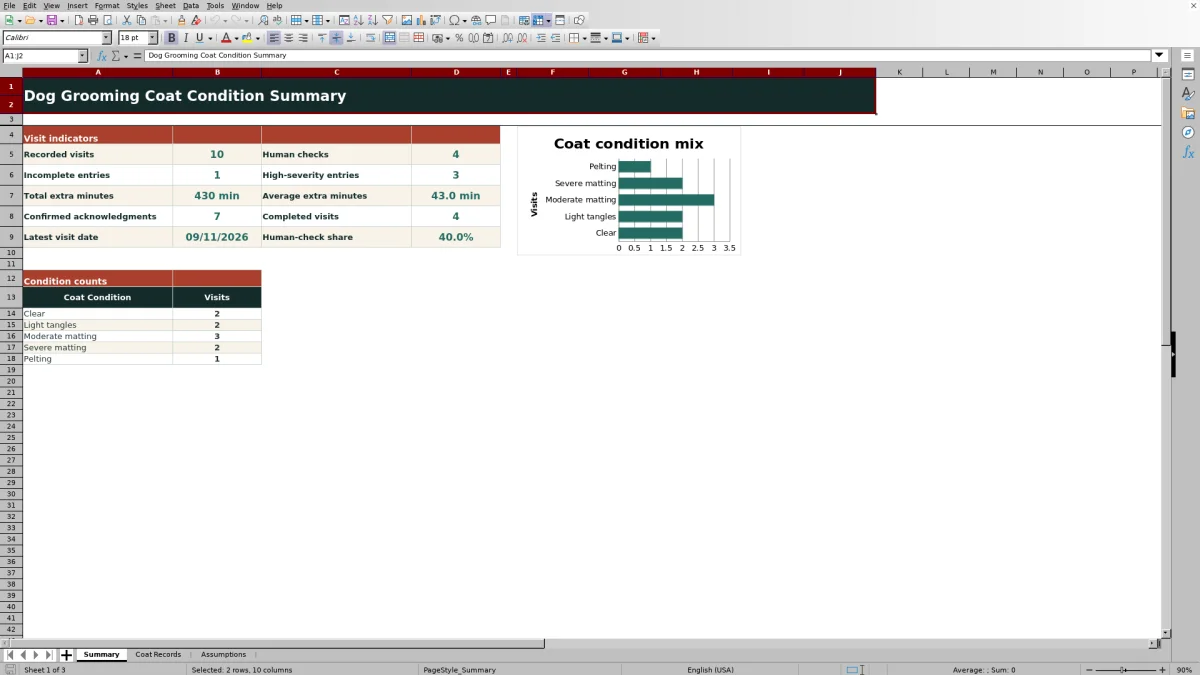
The Summary sheet reports recorded visits, incomplete entries, human checks, high-severity entries, total and average extra minutes, confirmed acknowledgments, completed visits, the latest visit date, and the human-check share. It also counts visits across the five configured coat conditions and presents those counts in a chart. After reviewing these indicators, the next decision may be to complete missing records, inspect a flagged visit, confirm owner acknowledgment, or assess whether extra-time patterns require operational follow-up.
Frequently asked questions
How many visit rows are prepared in the Excel workbook?
The Coat Records sheet contains 100 prepared record rows, running from row 5 through row 104.
What causes a HUMAN CHECK alert?
HUMAN CHECK appears when the severity score is at least 4, estimated extra minutes are at least 45, the owner scope acknowledgment is not Confirmed, or the handling scope is Reschedule for owner follow-up.
What is the difference between CHECK ENTRY and HUMAN CHECK?
CHECK ENTRY identifies a populated record with one or more formula-required fields missing. HUMAN CHECK indicates that a complete record meets at least one configured review condition.
Can the workbook choices and thresholds be adjusted?
Yes. The Assumptions sheet contains the editable coat-condition scale, coat lengths, handling scopes, entry limits, acknowledgment and status choices, and groomer assignments used by the record sheet and its formulas.
Are the sample pets and visits real?
No. The workbook states that all sample pets, people, references, and visits are fictional.
Editorial responsibility

Tessa MarloweClient records and service workflows

Caleb HensleyWorkbook QA and operating controls