This pet referral source tracker is an Excel workbook for recording where pet-service inquiries originate and following each referral through booking or non-conversion. It keeps client and pet aliases, source details, service interest, assignment, status, booking information, and follow-up dates together for consistent referral attribution.
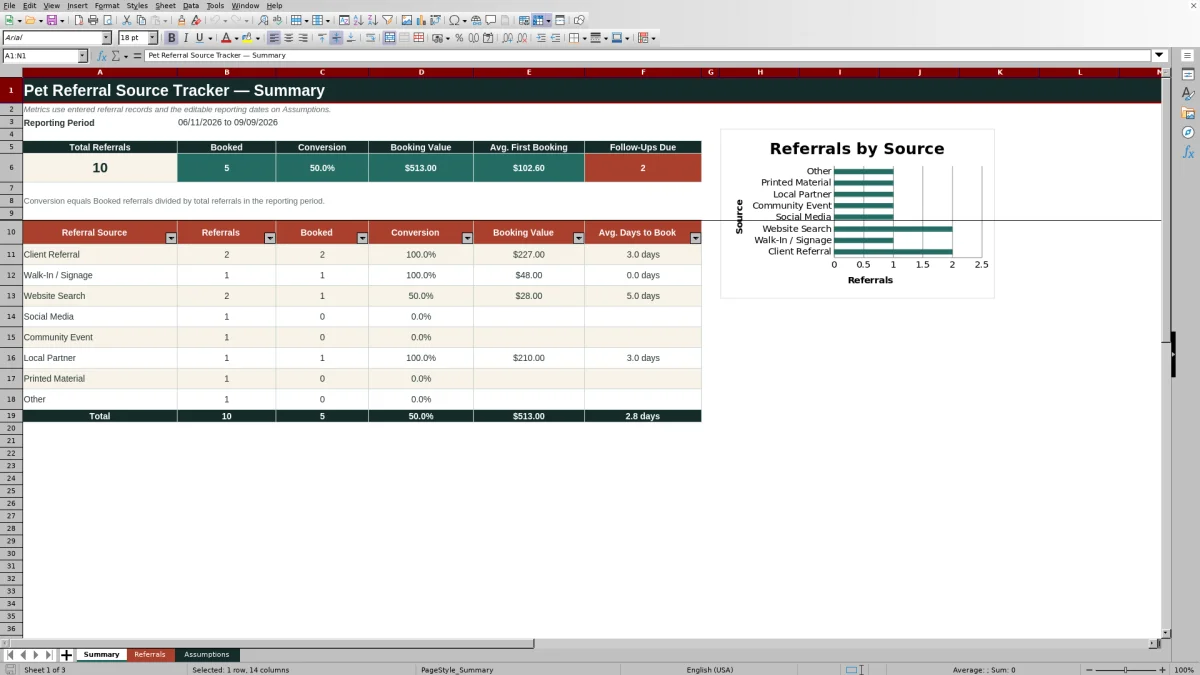
The XLSX converts those records into a decision-ready summary for an editable reporting period. It calculates referral volume, booked referrals, conversion rate, first-booking value, average first-booking value, follow-ups due, and source-level performance while retaining the underlying records for review.
How this workbook can help
- Connect each pet-service inquiry to a consistent referral source instead of relying on notes or memory.
- Compare referral volume, bookings, conversion rates, booking value, and booking speed by source.
- Keep ownership, status, first-booking details, follow-up dates, and notes in one filterable record log.
- Surface follow-ups that are past due while keeping final decisions and outreach under human control.
What is in the file
How to get started
1. Set the reporting period
Open the Assumptions sheet and enter the reporting window in the Reporting Start and Reporting End cells. Review the allowed date boundaries and maximum first-booking amount if your operating limits differ.
2. Review the controlled lists
Check the referral sources, service interests, team assignments, and referral statuses on the Assumptions sheet. These entries supply the dropdown choices used on the Referrals sheet.
3. Enter one referral record per row
On the Referrals sheet, add a unique referral ID, inquiry date, client and pet aliases, referral source, source detail, service interest, assigned team member, and current status. Use the notes field for context that does not fit the structured columns.
4. Update conversion and follow-up details
When an inquiry converts, change its status to Booked and enter the first-booking date and amount. For an unresolved inquiry, enter a follow-up date. The Days to Book column calculates automatically when both required dates are present.
5. Review and act on the Summary
Use the Summary sheet to review overall results and performance by referral source. Filter the Referrals sheet when you need to verify an unusual total, inspect a highlighted value, or identify the records behind a metric.
Situation: Referral Sources Become Hard to Evaluate
Pet-service inquiries can arrive through client recommendations, search, social media, signage, events, and other channels. When source information remains in appointment notes or separate messages, it becomes difficult to tell which channels generate inquiries, which produce bookings, and which require repeated follow-up. This tracker creates a structured record before those details are lost.
Action: Record Each Inquiry Consistently
Use one referral per row and select standardized values for referral source, service interest, team assignment, and status. Add the inquiry date when the lead first arrives, then update the same row with its first-booking date, first-booking amount, follow-up date, and notes. Consistent entries allow the formulas to group records accurately without replacing the context stored in Source Detail or Notes.
Result: Read Source Performance on the Same Basis
The Summary sheet applies the editable reporting dates to referral inquiry dates, giving every source the same date basis. It reports total referrals, booked referrals, conversion, booking value, average first-booking value, and follow-ups due. The source table adds referrals, bookings, conversion, booking value, and average days to book by channel. The included chart compares referral counts, so it should be read as a volume view rather than a conversion-rate chart.
Interpretation: Practical Referral Example
In the visible fictional sample, a Client Referral inquiry dated June 11 has a first booking on June 14 for $95, so Days to Book evaluates to three days. A Website Search inquiry dated June 26 has a first booking on July 1 for $28, producing five days to book. For these individual records, the client referral converted faster and produced a higher initial booking amount. That is a small-sample signal, not proof that one source is generally better; additional records are needed before changing channel priorities.
Errors and Solutions
If the Summary displays a request to set reporting dates or returns blanks, enter valid start and end dates on the Assumptions sheet. If an expected referral is missing from source totals, confirm that its inquiry date falls inside the reporting period and that its referral source matches a configured list value. If Days to Book is blank, supply both the inquiry date and first-booking date; if it is negative or highlighted, correct the date order after human review. If the follow-up count looks unexpected, check whether the record has a past follow-up date and a status other than Booked or Not Converted.
Comparison With a Contact List or CRM
This Excel template is designed for lightweight attribution and reporting rather than full customer relationship management. The comparison clarifies where each approach fits.
| Criterion | Pet Referral Source Tracker | Basic Contact List | CRM Platform |
|---|---|---|---|
| Source attribution | Uses a validated referral-source list with optional source details. | Usually relies on manually typed labels that may become inconsistent. | Can provide configurable source fields and campaign structures. |
| Conversion reporting | Calculates reporting-period totals and source-level booking conversion. | Usually requires manual counting or added formulas. | Often supports configurable pipelines, reports, and dashboards. |
| Follow-up handling | Stores follow-up dates and counts overdue items but sends no external alert. | Can store dates but generally offers no built-in due calculation. | May support tasks and automated reminders, depending on configuration. |
| Best-fit scale | Provides 100 preformatted referral rows for a focused, workbook-based process. | Works for simple recordkeeping but offers limited analysis. | Better suited to larger or more complex workflows that justify added setup and administration. |
Next Decision: Choose the Follow-Up or Channel Response
Use the metrics together rather than selecting a source from referral volume alone. A high-volume source with weak conversion may call for better response handling or clearer service information. A lower-volume source with strong conversion and faster booking may deserve more attention, while unresolved records with past follow-up dates should be reviewed first. Because the workbook records first-booking value but not acquisition cost, treat its values as booking performance—not return on investment—and gather more observations before making a major channel decision.
Frequently asked questions
What counts as a conversion in the pet referral source tracker?
A referral counts as a conversion only when its Status field is set to Booked. Other statuses, including New, Contacted, On Hold, and Not Converted, are not included in booked-referral counts.
Which date determines whether a referral appears in the Summary?
The Summary uses the Inquiry Date and includes records whose inquiry dates fall between the Reporting Start and Reporting End dates on the Assumptions sheet.
How is Days to Book calculated?
Days to Book equals the First Booking Date minus the Inquiry Date. The formula remains blank when either date is missing.
How does the workbook identify follow-ups due?
It counts records within the reporting period that have a follow-up date earlier than today and a status other than Booked or Not Converted.
Does the Excel workbook send follow-up reminders?
No. It highlights records for review and reports how many follow-ups are due, but it does not send email, text, calendar, or other external alerts.
Editorial responsibility

Tessa MarloweClient records and service workflows

Caleb HensleyWorkbook QA and operating controls